Why Computer Use Is More Than Clicking Buttons
What is computer use AI? It is an AI agent that operates software the way a person does — by looking at the screen and clicking, typing and scrolling — instead of through a purpose-built API. That makes it able to work with almost any website or application, which is why it is exciting. But the click is the easy part. To be useful and safe at work, a computer-use agent also has to understand the state of the software it is operating, treat what it reads on pages as information rather than instructions, ask for precise approval before consequential actions, know what actually happened when something goes wrong, and prove that a task is done rather than just say so. This article explains each of those requirements, gives a checklist for evaluating any computer-use tool, and describes how Ethen approaches them.
What is computer use AI? It is an AI agent that operates software the way a person does — by looking at the screen and clicking, typing and scrolling — instead of through a purpose-built API. That makes it able to work with almost any website or application, which is why it is exciting. But the click is the easy part. To be useful and safe at work, a computer-use agent also has to understand the state of the software it is operating, treat what it reads on pages as information rather than instructions, ask for precise approval before consequential actions, know what actually happened when something goes wrong, and prove that a task is done rather than just say so. This article explains each of those requirements, gives a checklist for evaluating any computer-use tool, and describes how Ethen approaches them.
Key takeaways
- Computer use means operating interfaces, not APIs. That gives broad reach and brings the messiness of real software.
- Supervision depends on visibility. You cannot supervise what you cannot see.
- Approvals must be precise. A "yes" should cover one specific action, not everything that follows.
- Pages are untrusted input. Text on a website can try to redirect an agent.
- Unclear outcomes need care. After a failure, "try again" can duplicate a payment or a message.
- "Done" needs evidence. An agent reporting success is a claim, not a proof.
What is computer use AI?
Computer use AI is a category of AI agent that controls a computer through its graphical interface. The agent receives what is on the screen — as an image, as the structure of a web page, or both — decides what to do next, and issues low-level actions such as moving the pointer, clicking, typing and scrolling. Browser agents are the most common form: they operate websites inside a browser. Broader computer-use agents operate desktop applications and the operating system too.
The appeal is reach. Most of the world's software was built for people, not for programs. Many business systems have no API, a limited one, or one that requires an integration project. An agent that can use the same interface a person uses can, in principle, help with any of them: filing an expense, updating a record in an old internal tool, gathering information across several sites, filling in a form.
The difficulty is that interfaces were designed for human eyes and judgment. They change without notice, hide state behind menus and tabs, show pop-ups at unpredictable moments and mix trustworthy content with untrusted content on the same page. Public benchmarks have made the gap concrete. When the OSWorld benchmark of real computer tasks was published in 2024, humans completed over 72% of its tasks while the best model completed about 12%. WebArena, a benchmark of realistic websites published in 2023, reported a similar gap: about 78% for humans and about 14% for the best agent at the time. Models have improved considerably since, but those early results show how much of the work lies beyond the mechanics of clicking.
The click is the easy part
Clicking is a solved problem: software has been able to move a pointer and press a button for decades. What makes computer use hard is everything around the click. Figure 1 shows five layers.
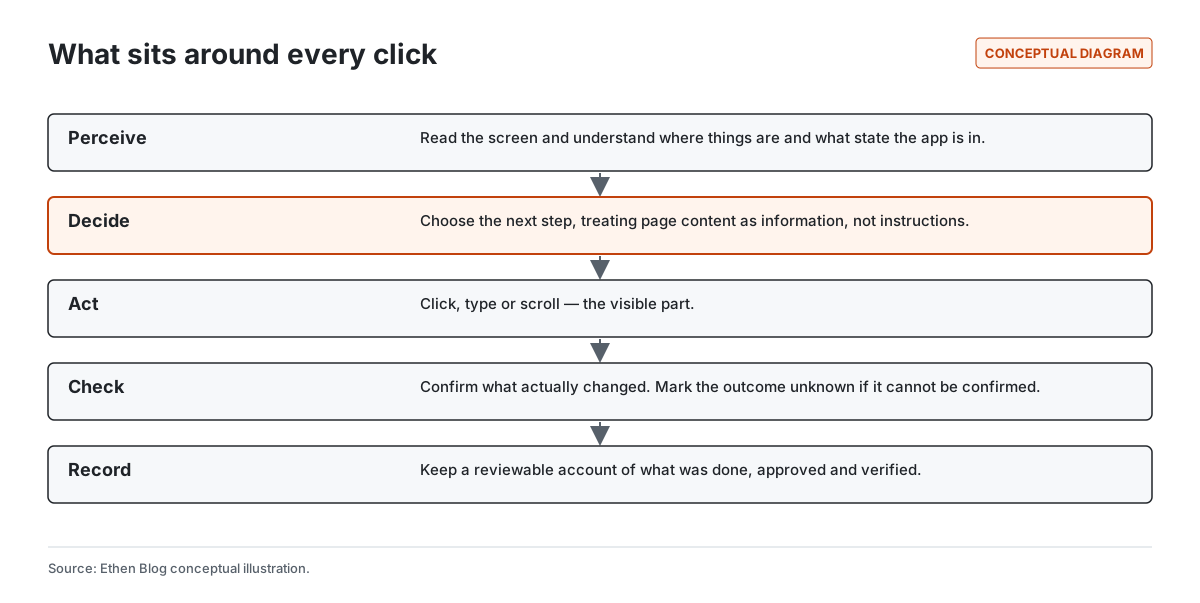
Perceive. The agent has to understand what is on the screen: which elements are buttons, which fields are filled, whether a dialog is open, whether the page has finished loading, whether it is signed in. Misreading state is the root of many failures — clicking a button that has moved, typing into the wrong field, acting on a page that has not finished updating.
Decide. The agent has to choose the next step toward the goal. This is where it is most vulnerable to manipulation, because the information it uses to decide includes whatever is on the page.
Act. The click, the keystroke, the scroll. The visible part, and the only part most demos show.
Check. After acting, the agent has to confirm what changed. Did the form submit? Did the record save? Did the page show an error that disappeared after a second?
Record. For work that matters, there needs to be a reviewable account of what was done, what was approved and what was verified.
A computer-use system that is strong at acting and weak at the other four layers will look impressive in a demo and be difficult to trust at work.
State: software does not stand still
The state of software changes constantly, and much of it is invisible. Sessions expire. A page shows cached data. A second tab changes something the first tab depends on. A colleague edits the same record. A shopping cart quietly updates a price. A form remembers values from last time.
People handle this with background knowledge and caution: they refresh, re-check, notice that something looks different. An agent needs explicit ways to do the same. That includes noticing when the page it is looking at no longer matches what it expected, re-checking important values just before acting on them, and treating long gaps between seeing a value and acting on it as a reason to look again.
State is also why computer-use tasks are harder to recover than they look. If an agent fails halfway through a multi-step process, the software it was operating may be in an intermediate state that neither the agent nor the person expected. We wrote about that general problem in What Happens When an AI Task Fails Halfway Through?
Pages are untrusted input
Anything a computer-use agent reads on a page can influence what it does next. That creates a specific security problem: text placed on a website, in an email or in a document can be written to look like instructions to the agent. Researchers demonstrated this kind of indirect prompt injection against applications that retrieve external content in 2023, and it is now listed among the top risks in the OWASP guidance for applications built on large language models.
For computer use, the risk is direct. An agent asked to summarize reviews on a product page might encounter hidden text telling it to visit another site. An agent processing an inbox might read an email instructing it to forward messages. If the agent treats page content as instructions, the person who wrote the page has partial control of the agent.
There is no single fix. Useful defenses include treating page content as information rather than commands, limiting what an agent may do in a given task, requiring approval for consequential actions, and watching for actions that do not fit the task. It is also important to be honest about the limits. In our engineering write-up on binding computer-use approvals to specific actions, we were explicit that precise approvals do not make an agent resistant to prompt injection. Injected content does not need to forge an approval; it only needs to influence which action the agent proposes. Approvals make each decision precise. They do not make each proposal trustworthy.
Supervision: precise approvals, not general permission
Supervision means a person can see what the agent is doing and must decide before it does anything consequential. The quality of supervision depends on what exactly the person is deciding.
A vague approval — "yes, keep going" — hands the agent trust for everything that follows, including actions the person never saw. A precise approval covers one specific action: this message, to this recipient, in this run, for this attempt, under these rules. Figure 2 shows a supervised step.
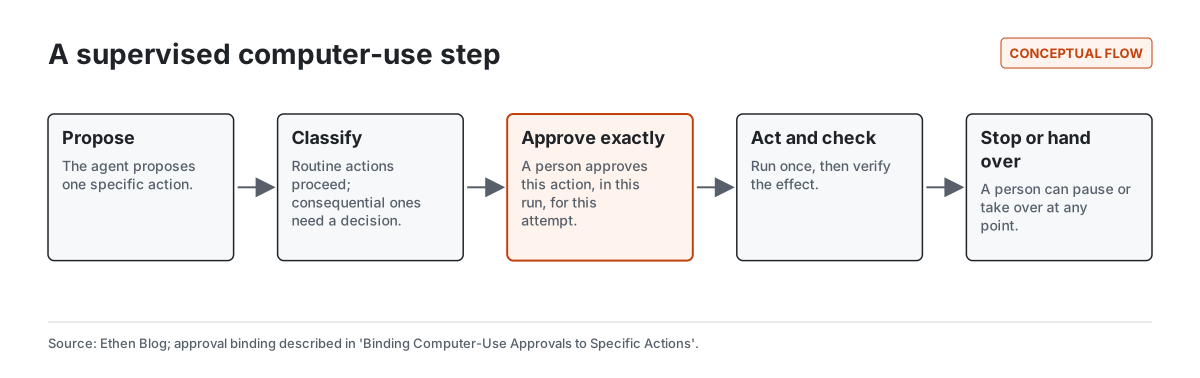
Ethen's approach, described in the engineering post linked above, binds each approval to the exact action, the run and the attempt in which it was requested, and the policy in force at the time. An approval can be used once. An approval from one session cannot be replayed into another, and an approval for one action cannot authorize a different action. That design comes from a broader principle we explain in Why Ethen Keeps Human Approval in the Loop.
Precise approvals have a cost: they ask more of the person supervising. The answer is not to make approvals vaguer but to make routine actions unnecessary to approve. Reading a page, scrolling and searching rarely need a decision. Sending, paying, deleting, submitting and changing other people's data usually do. Ethen Research Lab's work on Mandates, a research note, explores how a person's intent could be compiled into bounded authority for an agent, so that approvals can focus on what genuinely falls outside it.
Visibility: you cannot supervise what you cannot see
A person supervising a computer-use agent needs to see what the agent sees and what it is doing, in close to real time. That sounds obvious, but many systems show only the agent's narration — "I am now opening the settings page" — rather than the screen itself. Narration is the agent's account of what it is doing, and it can be wrong.
Good visibility includes a live view of the screen, a clear indication of the action about to happen, a history of what has happened in the run, and a plain display of anything waiting for approval. For long tasks, visibility also means being able to come back later and understand what happened while you were away, which connects to the kind of interface we described in Why Long-Running AI Work Needs a Different UX Than Chat.
Control: stop and take over, immediately
Control means a person can pause the agent, stop it, or take over the session at any point, and that the agent respects the change immediately. A stop button that takes effect after the current sequence of actions has finished is not really a stop button.
Taking over is especially important for computer use, because some steps are better done by a person: signing in, solving a problem the agent is stuck on, entering sensitive details, or judging something ambiguous. After a person takes over and hands back, the agent should re-read the state of the screen rather than assume nothing changed.
When the outcome is unclear
The most dangerous moment in computer use is often not a clear failure but an unclear one. The agent clicks "Pay", the page freezes, the connection drops. Did the payment go through? If the agent simply tries again, it may pay twice. If it assumes failure, it may report a task as incomplete when the payment actually happened.
The careful response is to treat the outcome as unknown: do not retry consequential actions blindly, check the real state where possible, and ask a person when the state cannot be confirmed. We wrote about this pattern in When an Agent Action's Outcome Is Unknown, and Ethen Research Lab explores it more formally in Unknown Effects in Autonomous AI Systems, a research note. For actions that cannot be undone at all, extra care is warranted, as we discuss in How Ethen Thinks About AI Actions That Can't Be Undone.
Proving a task is done
When a computer-use agent says it has finished, that is a claim. A form might have shown a success message and then failed in the background. A record might have saved with a wrong value. An agent might have stopped early and reported success.
Useful completion checks look at evidence: the confirmation number, the saved record, the sent message in the outbox, the downloaded file. Where evidence is not available, the honest status is "the agent believes this is done, but it could not be verified". We explain the broader principle in What "Done" Should Mean for an AI Agent, and Ethen Research Lab's Work Receipts technical report proposes a verifiable record format for autonomous work.
A checklist for evaluating computer-use tools
Whether you are evaluating Ethen or any other computer-use product, six questions separate a demo from a tool you can supervise. Figure 3 lists them.
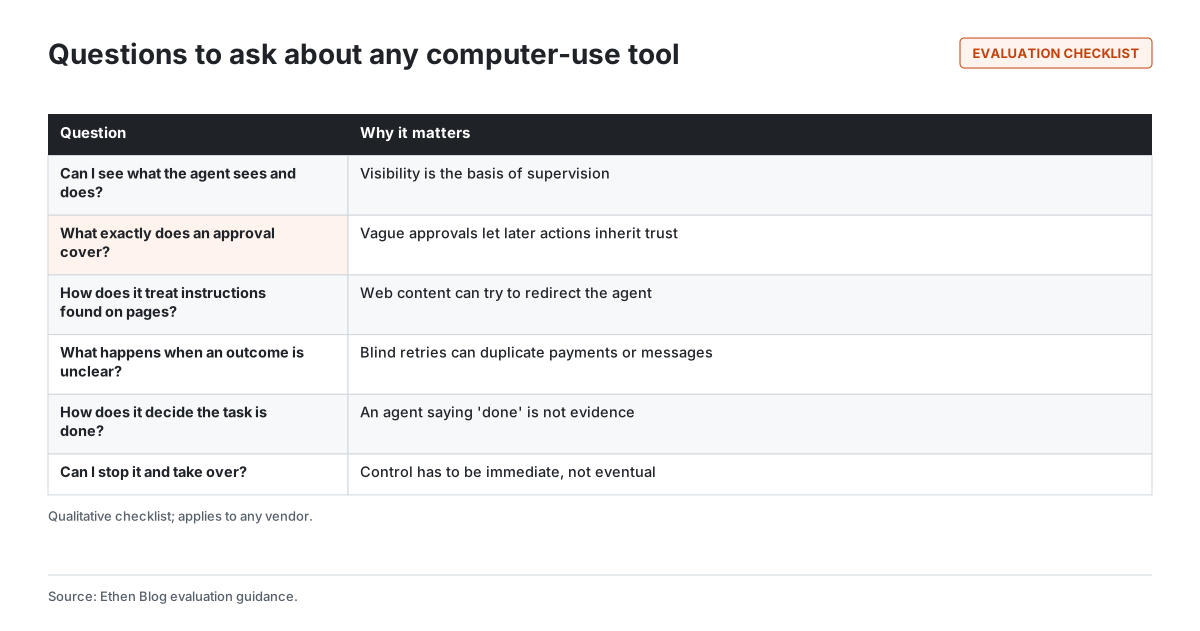
Ask a vendor to show, not just describe, the answers. Watch what happens when you approve one action: does the approval also cover the next one? Plant a harmless instruction in a test page and see whether the agent follows it. Interrupt the network during a test submission and see whether it retries. Ask what the record of a run contains and who can review it.
How Ethen approaches computer use
Ethen Computer is a product direction within the Ethen Platform, not a launched product, and this article makes no availability claim. The principles above are the ones we hold for it: visible sessions, precise and single-use approvals for consequential actions, page content treated as untrusted, immediate stop and takeover, careful handling of unclear outcomes, and completion based on evidence. Some of those, such as approval binding, have published engineering detail; others are direction. We describe the direction in more depth in What We're Building for Ethen Computer.
Tradeoffs and limitations
Supervision costs attention. Precise approvals and visible sessions ask more of people than fully autonomous agents. We think that cost is right for consequential actions and should be minimized for routine ones.
Defenses against injected instructions are partial. No current approach fully prevents a page from influencing an agent. Limiting authority and requiring approval reduce the damage; they do not remove the risk.
Benchmarks lag reality. Public benchmark results are snapshots, and figures quoted here describe the benchmarks when they were published, not current models or Ethen.
Interfaces change. Agents that depend on screen layouts can break when software is redesigned. APIs, where they exist, are usually more reliable, and computer use is best treated as a way to reach what APIs do not.
FAQ
What is computer use in AI? An AI agent that operates software through its interface — seeing the screen and clicking, typing and scrolling — instead of through an API.
Are computer use agents safe? They can be made safer with visibility, precise approvals, limited authority, careful handling of untrusted pages and evidence-based completion checks. No current approach fully removes the risk of manipulation by page content.
How do you supervise an AI agent using a browser? Watch a live view of what it sees, approve consequential actions individually and precisely, and keep the ability to stop or take over immediately.
What is indirect prompt injection? Text placed in content an agent reads, such as a web page or email, written to look like instructions so the agent acts on it.
Is computer use better than using APIs? Usually not, where a good API exists. Computer use is valuable for reaching software that has no suitable API.
Related reading
- Binding Computer-Use Approvals to Specific Actions
- What We're Building for Ethen Computer
- When an Agent Action's Outcome Is Unknown
- Why Ethen Keeps Human Approval in the Loop
- What "Done" Should Mean for an AI Agent
References
- Xie, T., Zhang, D., Chen, J., et al. (2024). OSWorld: Benchmarking Multimodal Agents for Open-Ended Tasks in Real Computer Environments. arXiv:2404.07972. https://arxiv.org/abs/2404.07972
- Zhou, S., Xu, F. F., Zhu, H., et al. (2023). WebArena: A Realistic Web Environment for Building Autonomous Agents. arXiv:2307.13854. https://arxiv.org/abs/2307.13854
- Greshake, K., Abdelnabi, S., Mishra, S., et al. (2023). Not what you've signed up for: Compromising Real-World LLM-Integrated Applications with Indirect Prompt Injection. arXiv:2302.12173. https://arxiv.org/abs/2302.12173
- OWASP. OWASP Top 10 for Large Language Model Applications. https://owasp.org/www-project-top-10-for-large-language-model-applications/
- Ethen Research Lab (2026). Mandates: Compiling Human Intent Into Bounded Agent Authority. Research note. https://upcube.ai/resources/research/agent-mandates
- Ethen Research Lab (2026). Unknown Effects in Autonomous AI Systems: Why Timeouts Are Not Permission to Retry. Research note. https://upcube.ai/resources/research/unknown-effects
- Ethen Research Lab (2026). Work Receipts: A Verifiable Record for Autonomous AI Work. Technical report. https://upcube.ai/resources/research/work-receipts