Ethen Studio: From Model Catalog to Creative Workspace
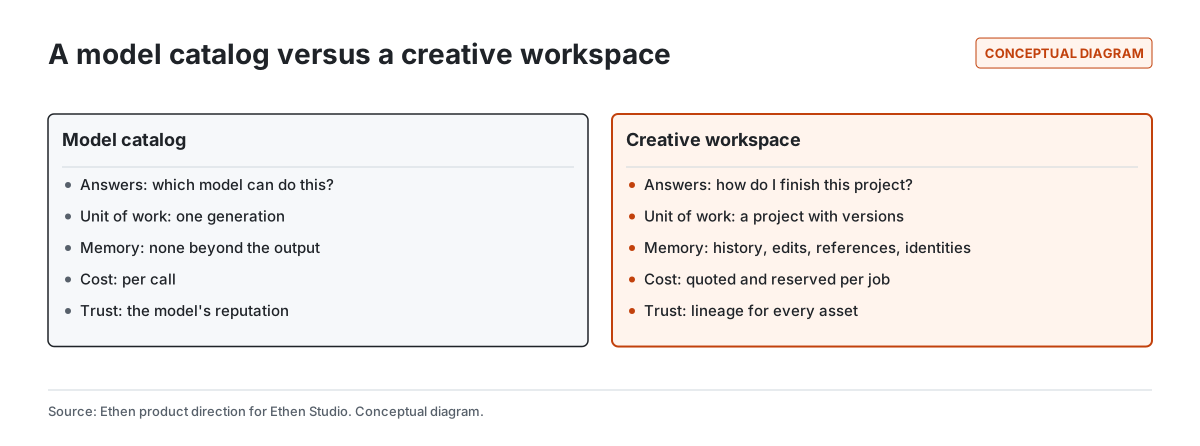
Ethen Studio is evolving from a place to choose image, video, audio and voice models into a creative workspace: a place where a project, its history, its edits, its assets and its costs live together. A model catalog answers "which model can do this?". A creative workspace answers "how do I finish this project, keep it consistent, and know how each asset was made?". The catalog stays — Studio is the home of Ethen's full creative model catalog — but it becomes a tool inside the project rather than the whole product. This article explains what that shift means, what is already in place, what is direction, and what we are not claiming.
Ethen Studio is evolving from a place to choose image, video, audio and voice models into a creative workspace: a place where a project, its history, its edits, its assets and its costs live together. A model catalog answers "which model can do this?". A creative workspace answers "how do I finish this project, keep it consistent, and know how each asset was made?". The catalog stays — Studio is the home of Ethen's full creative model catalog — but it becomes a tool inside the project rather than the whole product. This article explains what that shift means, what is already in place, what is direction, and what we are not claiming.
Key takeaways
- The unit of creative work is a project, not a generation. Projects hold briefs, references, versions, edits and approvals.
- Every asset should carry its lineage. Which inputs, model, settings and edits produced it — so it can be reproduced, revised or reviewed.
- Listing a model is not the same as running it reliably. Studio runs a model through a qualified path with validation, cost quotes and reconciliation, and a catalog listing does not by itself make a model runnable.
- Consistency and rights are workspace features. Recurring characters, brand styles and voices need explicit, recorded rights.
- Chat stays curated; Studio holds the full catalog and the project.
Why isn't a model catalog enough?
A model catalog is the right starting point and the wrong finishing point. The number of image, video, audio and voice models has grown so fast that simply finding a capable model is real work, and a well-organized catalog — grouped by what a model is for rather than by provider endpoint — saves people time. Our own catalog work showed how much normalization that takes: one provider export can contain far more callable endpoints than there are genuinely distinct model families, as described in From Provider Endpoints to Ethen Model Families.
But creative work is rarely one generation. A campaign needs a dozen consistent images. A product video needs several clips that match in style and lighting. A podcast trailer needs a voice, music and edits. The person doing the work spends most of their time not choosing models but iterating: adjusting, comparing, rejecting, refining, assembling and getting approval. A catalog has nowhere to put any of that. The work ends up scattered across downloads folders, chat threads and spreadsheets, and the record of how a final asset was made is lost.
What does "creative workspace" mean in Ethen Studio?
A creative workspace is a place where everything needed to finish and revisit a creative project persists together. In Ethen's product map, Studio is the canonical home for creative work: image, video, audio and voice; generation, editing and upscaling; workflows; projects; history; assets; and a model explorer. Each of those is an answer to a specific way creative work goes wrong in a catalog-only tool.
Projects give work a container. A brief, its references and every attempt toward it belong together, so a project can be paused and resumed — by the same person next week or by a colleague tomorrow.
History and versions make iteration safe. When a later edit makes things worse, the earlier version is still there, along with what changed between them.
Assets are the outputs worth keeping, organized for reuse rather than buried in a session.
Editing is treated as first-class work rather than as starting over. Most creative quality comes from edits, and an edit is more informative than a fresh generation because it records what the person wanted changed.
The model explorer keeps the catalog available inside the project, so choosing a different model for one shot does not mean leaving the work.
What is already in place?
The most important foundation for a creative workspace is that generation jobs behave predictably, because creative jobs cost real money and can take minutes. Ethen Studio has an implemented path for durable media jobs. A prompt and its inputs are validated against what the chosen model actually supports; unsupported options are rejected rather than silently dropped. The job is checked against provider health. The cost is quoted before generation, and budget is reserved before work starts. When a provider's response is uncertain — for example, a request that may or may not have been accepted — the job is reconciled against what actually happened rather than resubmitted blindly, which avoids paying twice for the same output.
That path is qualified for a small set of specific workflows: text to image, image editing, text to video and image to video. The engineering write-up, Building Durable Image and Video Jobs in Ethen Studio, is explicit about a principle that shapes the whole direction: a model appearing in a catalog does not make it runnable. Only a verified route with evidence behind it does. We think that honesty is part of what a creative workspace owes its users. A long menu of models that silently fail is worse than a shorter menu that works.
Status: the durable job path is an implemented mechanism with stated test limits; the broader workspace described below is direction.
Where Studio is going
The direction for Studio has five parts. None of them is a dated commitment; together they describe what we are building toward.
1. Projects as the unit of work
The first change is structural: work starts in a project, and generations, edits and assets belong to it. That makes it possible to come back, hand off, compare alternatives side by side, and review a project as a whole rather than as a scattered set of files.
2. Lineage for every asset
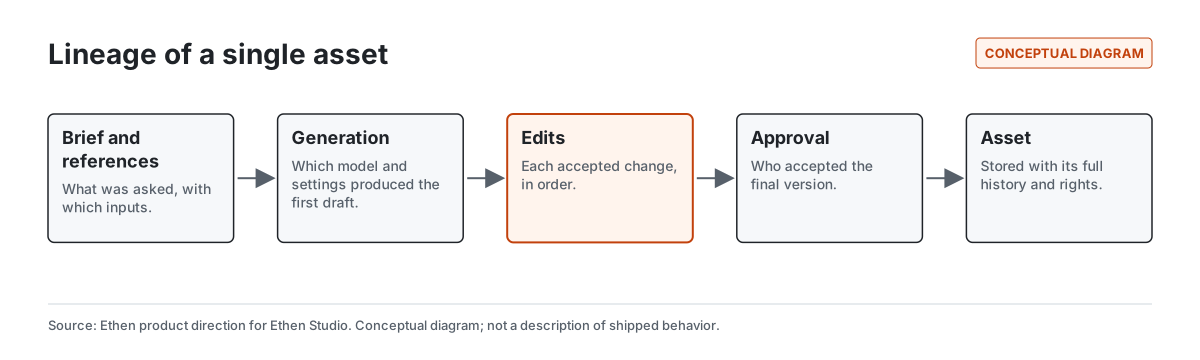
Every asset should carry the chain that produced it: the brief, the reference inputs, the model and settings used, each accepted edit, and who approved the final version. Lineage turns an image from a file into a record. It lets a team reproduce an asset, revise it with the same settings, understand why two assets differ, and answer questions about provenance later.
Industry standards for content provenance, such as the C2PA specification, address a related problem for media that leaves a workspace: attaching verifiable information about how content was created. We mention the standard because it shows the direction the industry is moving; this article makes no claim about Studio's support for it.
3. Edits that capture intent
When someone accepts an edit — "make the background warmer", "keep the character, change the pose" — they are telling the system what mattered. Treating edits as first-class work means keeping that sequence, making it easy to branch from any point, and letting people reuse a successful edit on other assets. It is also where creative tools most often lose information today, because a new generation replaces the old one without recording why.
4. Consistency across assets, with explicit rights
The hardest problem in AI-assisted creative work is often consistency: the same character across a series, the same product across angles, the same brand style across a campaign, the same voice across episodes. A workspace can hold the references and settings that make consistency achievable.
Consistency also raises rights questions that a catalog never has to face. A recurring character may be someone's likeness. A voice may belong to a real person. A brand style may belong to a client. The direction for Studio is that these rights are explicit and recorded with the identity or asset, not assumed. Ethen Research Lab's research note Rights as Infrastructure argues more generally that data and derived artifacts should carry machine-readable records of how they may be used; it is an architecture proposal that requires legal review, and we cite it for the principle rather than as a description of Studio.
5. Cost and reliability you can see per job
Creative generation can be expensive, and video especially so. A workspace should show the cost of a job before it runs, reserve budget so that a project does not overspend by surprise, and record what each asset actually cost. The implemented job path already quotes and reserves; the direction is to make those numbers visible at the project level, so a team can see what a campaign cost to produce and where the iterations went.
A worked example: one campaign, two ways
Illustrative example — a hypothetical project, not a customer story or a measured result.
A small team is preparing launch visuals for a new product: six still images in a consistent style, two short video clips, and a voice-over for one of the clips.
In a catalog-only tool, each asset starts from a blank prompt. The team tries three image models, downloads the ones they like, and pastes the winning prompts into a shared document. The fourth image drifts in style, so they regenerate it several times, and nobody records which settings produced the version that was finally approved. The video model needs a reference image, which someone exports from a downloads folder. Two weeks later, the client asks for one more image "exactly like the others". Reproducing it means guessing at prompts and settings, and the cost of all those experiments is spread across invoices nobody can map back to the campaign.
In a creative workspace, the campaign is a project. The brief and the reference images live in it. Each generation is recorded with the model and settings that produced it, and each accepted edit is kept in sequence. The approved style becomes a reusable reference for the remaining images and for the video clips, which take their starting frames from approved assets rather than from someone's downloads folder. The voice-over is generated with a voice whose usage rights are recorded on the project. Each job shows its cost before it runs. When the client asks for one more image, the team opens the project, starts from the approved lineage, and produces a match — and can show exactly how it was made.
The difference is not a better model. Both versions of the story can use the same models. The difference is whether the work has somewhere to live.
How do Chat and Studio divide the work?
Chat and Studio are designed to divide creative work by depth. Ethen Chat offers a curated creative entry point: a small set of recommended options for a quick image, a short clip, a piece of audio, or a voice interaction, with a clear path that says "more models" and opens Studio. Studio holds the full catalog and the project. We describe the reasoning in Keeping Ethen Chat Focused: a single generation fits in a conversation; a project with versions, edits and assets does not.
Voice follows the same split. Conversational voice — talking to Ethen — belongs in Chat. Voice generation, narration, speech models and voice projects belong in Studio.
How should creators choose models inside Studio?
Choosing a model inside a creative workspace starts from the workflow, not from a leaderboard. Ask what kind of transformation you need (text to image, image editing, text to video, image to video), what inputs it must accept, whether the model is eligible to run through a qualified path, and how its output will be checked and delivered. Our guide Choosing Image and Video Models by Workflow walks through that approach. The public Model Library and Ethen Model Intelligence are the places to explore models in general; Studio is where the chosen model meets the project.
What we are not claiming
- No catalog size claims. We do not state how many models Studio can run; the number that matters is how many run reliably through a qualified path, and that changes.
- No availability or dates. The workspace features above are direction.
- No quality rankings. Creative quality is subjective and depends on the brief; we do not rank models here.
- No provenance-standard support claim. C2PA is mentioned as context only.
Tradeoffs
A workspace is heavier than a catalog. People who want one image quickly do not want to create a project first, which is why Chat keeps a light path. Recording lineage costs storage and requires care about what is kept and who can see it, because briefs and references can be confidential. And explicit rights take effort to capture; the alternative — assuming rights — is cheaper until it is not. The direction is to make the light path light and the heavy path worth it.
Frequently asked questions
Is Ethen Studio a model marketplace? No. Studio includes the full creative model catalog, but its purpose is to help people finish creative projects, with history, edits, assets and costs kept together.
Can I use any listed model in Studio? A listed model is not automatically runnable. Studio runs models through qualified paths that validate inputs, quote costs and reconcile uncertain outcomes; availability differs by model.
How is Studio different from creative generation in Ethen Chat? Chat offers a curated, quick entry point. Studio holds the full catalog and the project — versions, edits, assets and lineage.
Who owns rights to characters and voices used in Studio? Rights depend on the asset and the agreements behind it. The direction for Studio is that rights to likeness, voices and client assets are explicit and recorded with the asset rather than assumed.
Related reading
- Building Durable Image and Video Jobs in Ethen Studio — the implemented job path and its limits.
- Why Ethen Is a Family of Specialized AI Apps, Not One App — why Studio is its own app.
- Rights as Infrastructure — Ethen Research Lab architecture proposal (requires legal review).
References
- Ethen Blog (2026). Building Durable Image and Video Jobs in Ethen Studio. https://upcube.ai/blog/building-durable-image-and-video-jobs-in-ethen-studio
- Ethen Blog (2026). From Provider Endpoints to Ethen Model Families. https://upcube.ai/blog/from-provider-endpoints-to-ethen-model-families
- Ethen Blog (2026). Choosing Image and Video Models by Workflow. https://upcube.ai/blog/choosing-image-and-video-models-by-workflow
- Ethen Blog (2026). Keeping Ethen Chat Focused. https://upcube.ai/blog/keeping-ethen-chat-focused
- C2PA. Technical specification. https://c2pa.org/specifications/
- Ethen Research Lab (2026). Rights as Infrastructure: Building AI Datasets That Know How They May Be Used. Research note; architecture proposal. https://upcube.ai/resources/research/rights-as-infrastructure