Why Ethen Studio Is Becoming More Workflow-Oriented
An AI creative workflow is a chain of steps, not a single prompt. Real creative work moves from a brief, to several generated options, to a person's choice, to edits that keep some things and change others, to animation or adaptation for different formats, and finally to delivery. Each step depends on what came before. That is why Ethen Studio is becoming more workflow-oriented: so that the brief, references, chosen outputs and decisions carry forward from step to step; so that consistency across assets comes from shared references rather than luck; so that spend is quoted and reserved before work runs; so that a failed step can be resumed or reconciled rather than restarted; and so that a chain that worked can be run again with new inputs. Parts of this are already in place in Studio's published media pipeline. The rest is direction, which this article describes without dates.
An AI creative workflow is a chain of steps, not a single prompt. Real creative work moves from a brief, to several generated options, to a person's choice, to edits that keep some things and change others, to animation or adaptation for different formats, and finally to delivery. Each step depends on what came before. That is why Ethen Studio is becoming more workflow-oriented: so that the brief, references, chosen outputs and decisions carry forward from step to step; so that consistency across assets comes from shared references rather than luck; so that spend is quoted and reserved before work runs; so that a failed step can be resumed or reconciled rather than restarted; and so that a chain that worked can be run again with new inputs. Parts of this are already in place in Studio's published media pipeline. The rest is direction, which this article describes without dates.
Key takeaways
- Creative work is a chain. Brief, generate, select, edit, adapt, deliver.
- Choices are the valuable part. What a person selects between steps should be kept.
- Consistency comes from references, not luck. Shared identities and styles carry across a workflow.
- Cost should be known before work runs. Quotes and reservations per step.
- Failures should be recoverable at the step. Not by starting over.
- Workflows should be reusable. A chain that worked once should work again.
Why a single prompt is not enough
Modern image and video models can produce remarkable results from a single prompt. For a one-off illustration, that may be all you need. But most creative work in a business is not one-off. A product launch needs a hero image, social variants in several aspect ratios, a short video, and consistent styling across all of them. A brand needs the same character or product to look the same in every asset. An agency needs to produce similar work for many clients without reinventing the process each time.
Single-prompt generation struggles with all of these. Context has to be re-typed each time. Consistency depends on luck and careful prompt copying. The person's best decisions — "this one, not that one", "keep the background, change the lighting" — disappear into a history of attempts. Costs are discovered after the fact. And when something fails partway, the usual remedy is to start again.
The industry has noticed. In 2025 and 2026, several creative AI tools introduced node-based or chained workflows that connect multiple models and steps into reusable pipelines, and creative teams increasingly talk about generating categories of content consistently rather than single images. We think this direction is right, and that the important question is what a workflow should preserve, not just how steps connect.
A creative workflow is a chain, not a prompt
Figure 1 shows a typical chain.
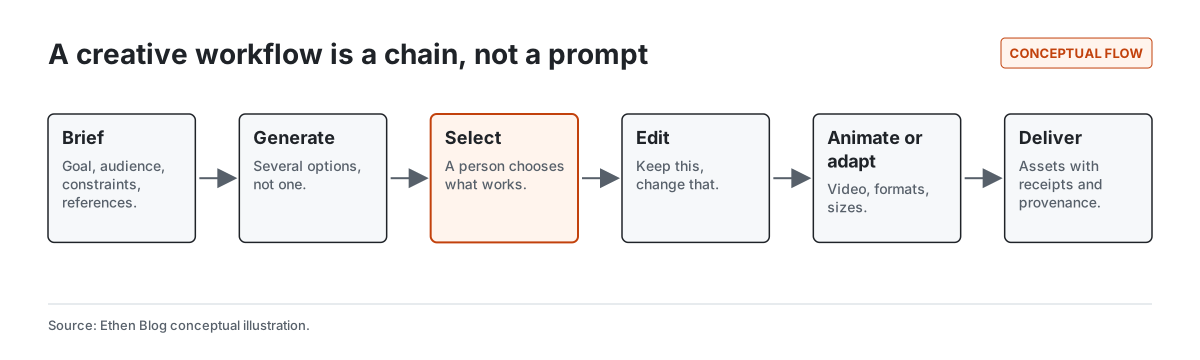
Brief. The goal, the audience, the constraints and any reference material: brand assets, examples, characters, styles.
Generate. Several options, because the first is rarely the best and seeing alternatives clarifies what the person actually wants.
Select. A person chooses. This step is highlighted because it is where human judgment enters the workflow, and it is the step most tools treat as disposable.
Edit. "Keep this, change that." Image editing works from a chosen output and a reference, preserving what matters.
Animate or adapt. Turn a still into a short clip, or adapt it to different formats and sizes.
Deliver. Final assets, with a record of how they were made.
Research on creativity support tools has long argued that good tools should support exploration — generating and comparing alternatives — while keeping a history that lets people return to earlier ideas. Ben Shneiderman's work on creativity support, for example, emphasized exploring many alternatives and reviewing and revisiting earlier work. A workflow that records choices does exactly that.
What Studio already does
Studio's published media pipeline, described in Building Durable Image and Video Jobs in Ethen Studio, already provides several of the foundations a workflow needs.
Four qualified workflows. Text-to-image, image editing, text-to-video and image-to-video each run on a verified route, with inputs validated against what that route accepts. A model appearing in a catalog does not make it runnable; only a verified route does.
Validation before submission. Requests that do not match a workflow's inputs — an image edit with no reference image, a video with an unsupported duration — are rejected before any cost is incurred.
Quotes and reservations. Cost is quoted and budget is reserved before a job is admitted, so spend is known up front.
Receipts and delivery records. Each delivered asset comes with a record of what produced it.
Reconciliation of uncertain outcomes. If a job's outcome is unclear, it is reconciled or escalated rather than blindly retried.
These are the building blocks of individual steps. A workflow connects them. For choosing between the four workflows by task, see Choosing Image and Video Models by Workflow.
One-off generation versus a workflow
Figure 2 contrasts the two approaches.
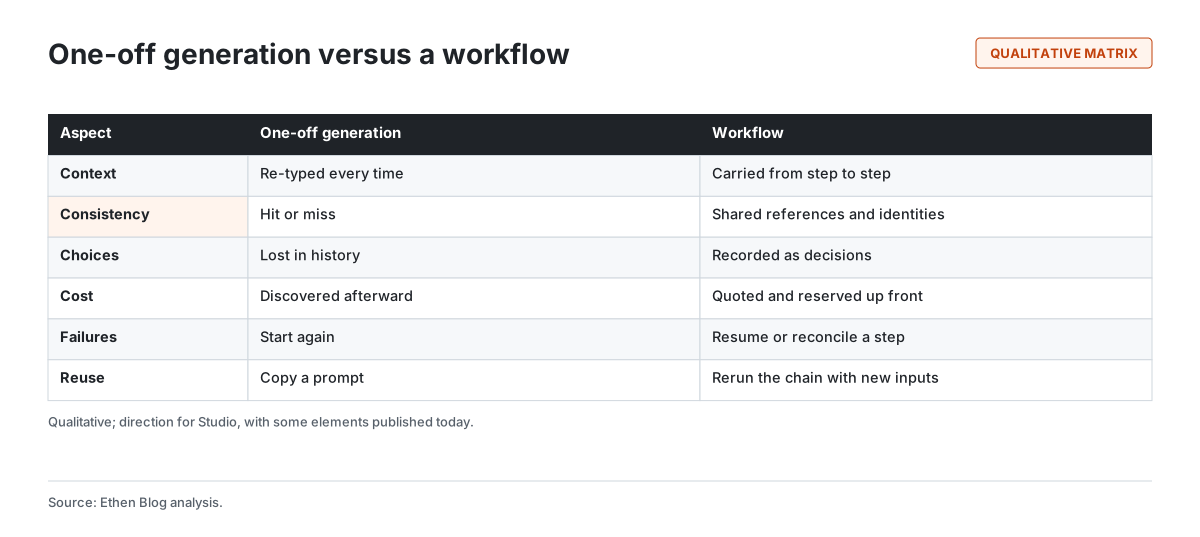
Context. In one-off generation, context is re-typed every time. In a workflow, it is carried from step to step.
Consistency. One-off results are consistent only by luck. A workflow shares references and identities across every step.
Choices. One-off choices are lost in a scroll of attempts. A workflow records them as decisions.
Cost. One-off generation reveals cost afterward. A workflow quotes and reserves before each step runs.
Failures. One-off generation starts again. A workflow resumes or reconciles the failed step.
Reuse. Reusing a one-off means copying a prompt. Reusing a workflow means running the chain again with new inputs.
What a Studio workflow should keep
The direction for Studio is that a workflow keeps five kinds of information, shown in Figure 3.
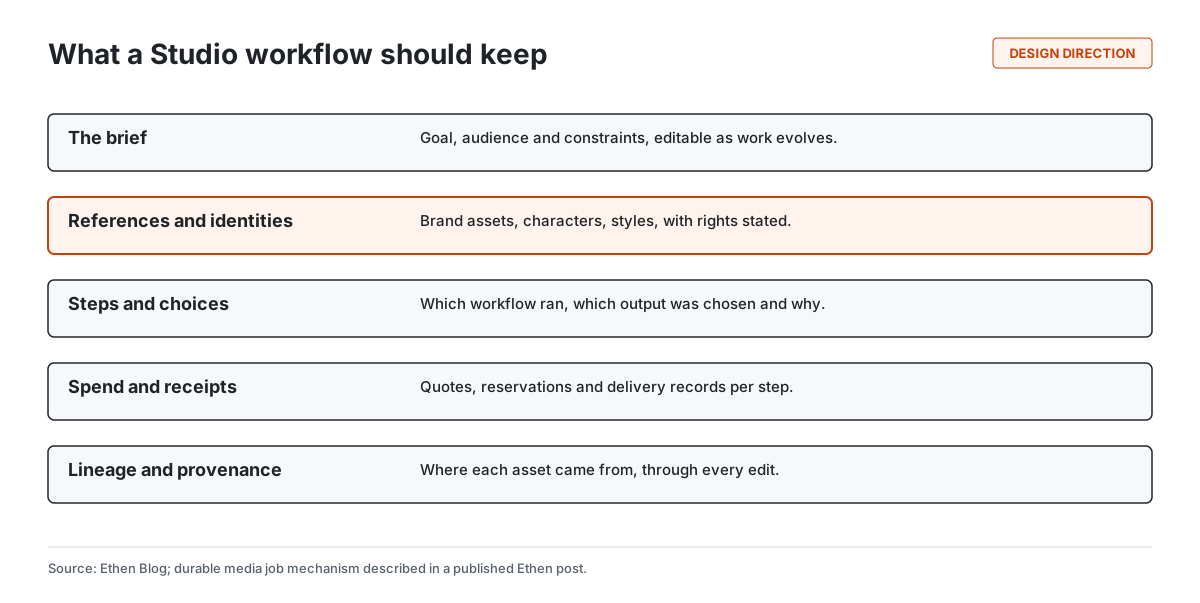
The brief. Editable as the work evolves, so later steps reflect what the person now wants, not what they first typed.
References and identities. Brand assets, recurring characters, products and styles that should look the same across every asset. These come with rights: whose likeness, whose brand, what use is permitted. Using a real person's likeness or voice requires explicit rights, and a workflow should carry that information rather than leave it to memory.
Steps and choices. Which workflow ran at each step, which output the person chose, and, where useful, why.
Spend and receipts. What each step was quoted, what was reserved, and what was delivered.
Lineage and provenance. Where each final asset came from, through every edit. Industry standards for content provenance, such as the C2PA specification for content credentials, provide a way to attach that kind of history to media files. Recording lineage inside the workflow is the first step toward being able to export it.
Why workflows matter for teams
Workflows matter even more for teams than for individuals.
Handoffs. A designer generates options, a marketer chooses, an editor adapts. A workflow lets each person see what came before and why.
Review and approval. A team can require approval before spend above a limit or before assets are delivered externally.
Brand consistency. Shared references mean every team member works from the same brand assets and characters.
Repeatability. A workflow that produced a successful campaign can be rerun for the next one, with new inputs and the same structure.
We describe the broader idea of Studio as a place where creative work lives — projects, history, assets — in Ethen Studio: From Model Catalog to Creative Workspace. Workflows are how work moves through that space.
A worked example
The following example is illustrative. A small coffee brand is launching a seasonal drink.
The brief describes the drink, the audience and the brand's established illustration style, and attaches the brand's color palette and a reference image of their mascot. Studio generates six illustration options. The marketer picks one and asks for an edit: keep the mascot and the cup, change the background to an autumn street. The edited image is adapted to square, vertical and wide formats. The vertical version is animated into a five-second clip for social media.
At each step, the cost is quoted before it runs. The image-to-video step fails once because the provider does not respond; the workflow reconciles the step instead of submitting a duplicate job. When the campaign is done, every asset has a record: which brief, which choices, which edits, what it cost.
The following month, the brand reruns the same workflow for a winter drink, with a new description and the same references. The mascot looks the same, the style is consistent, and the marketer's work is the choices, not the setup.
Five tips for designing a good creative workflow
Whatever tool you use, a few habits make AI creative workflows more reliable.
Start from the final deliverables. List every asset you need — formats, sizes, durations — before generating anything. Work backward to the steps.
Fix references early. Choose the brand palette, style examples and character references at the brief stage and reuse them at every step. Changing references midway is the most common cause of inconsistency.
Generate wide, then narrow. Ask for several options at the first generation step, choose deliberately, and edit from the chosen output rather than regenerating from scratch. Editing preserves what you liked; regenerating gambles it.
Separate creative choices from production steps. Choosing a concept needs a person. Resizing a chosen image into five formats usually does not. Put human checkpoints where judgment matters and let production steps run.
Keep the record. Note which outputs were chosen and why. The next campaign will be faster if you can see what worked.
Where people stay in the loop
A workflow-oriented Studio is not about removing people from creative work. It is about putting their time where it counts.
Choosing. Selecting among options is a creative act. Studio should make comparing options easy and record the choice.
Approving spend. Expensive steps, such as long or high-resolution video, can require approval before they run, with the quote visible.
Approving external delivery. Assets that will be published or sent to a client can require review first.
Handling rights. Decisions about using a real person's likeness, a third-party brand or licensed material stay with people, and the workflow carries the decision forward.
These checkpoints are configurable by the team. The principle, which applies across Ethen, is that consequential decisions are made by people and recorded, while routine steps run without interruption.
How workflows relate to models
A workflow is not tied to a particular model. Each step uses whichever qualified model fits that step, and a model can be changed without rebuilding the workflow — as long as the new model is checked on the step's task first. That connects workflows to how Ethen thinks about model catalogs. The catalog is organized by model families, with many provider endpoints grouped under each family, and only verified routes are runnable. We explain the catalog in What 1,499 AI Endpoints Taught Us About Model Catalog Design, and how image, video, audio and speech fit together in How We Think About Image, Video, Audio and Speech as One Creative System.
What we are not claiming
This article describes direction. Studio's published pipeline supports four qualified workflows with validation, quotes, reservations, receipts and reconciliation, with the test limits stated in the engineering post. Multi-step workflow chaining, reusable workflow templates, shared identities with rights metadata, and provenance export are directions, not announced features. We are not claiming quality rankings for any model, and we are not announcing dates.
Tradeoffs and limitations
Workflows add structure. For a quick one-off image, a workflow is more than you need. Studio should keep single generation simple.
Consistency is still hard. Shared references improve consistency but do not guarantee it; models vary in how faithfully they follow references.
Recording choices takes discipline. A workflow that asks why at every step becomes a chore. Recording should be lightweight and mostly automatic.
Rights need care. Carrying likeness and brand rights through a workflow helps, but does not replace legal agreements.
FAQ
How do I build a repeatable AI creative workflow? Write a brief with references, generate several options, choose, edit, adapt to formats, and keep a record of each choice. Then rerun the same chain with new inputs.
How do I keep AI-generated images consistent? Use the same reference images, characters and style assets at every step, and edit from chosen outputs rather than regenerating from scratch.
What is Ethen Studio becoming? A creative workspace where multi-step workflows carry briefs, references, choices, spend and provenance from step to step.
Which workflows does Ethen Studio support today? Its published durable pipeline qualifies text-to-image, image editing, text-to-video and image-to-video, each on a verified route.
Does Studio track the cost of each step? Its published pipeline quotes cost and reserves budget before a job is admitted, and records delivery.
Related reading
- Ethen Studio: From Model Catalog to Creative Workspace
- Building Durable Image and Video Jobs in Ethen Studio
- Choosing Image and Video Models by Workflow
- How We Think About Image, Video, Audio and Speech as One Creative System
- Why Ethen Is Building for Recoverable AI Work
References
- Shneiderman, B. (2007). Creativity support tools: accelerating discovery and innovation. Communications of the ACM, 50(12), 20–32. https://doi.org/10.1145/1323688.1323689
- Coalition for Content Provenance and Authenticity. C2PA Technical Specification. https://c2pa.org/specifications/
- Ethen Blog. Building Durable Image and Video Jobs in Ethen Studio. https://upcube.ai/blog/building-durable-image-and-video-jobs-in-ethen-studio
- Ethen Blog. Choosing Image and Video Models by Workflow. https://upcube.ai/blog/choosing-image-and-video-models-by-workflow