How We Think About Image, Video, Audio and Speech as One Creative System
A multimodal AI creative system treats image, video, audio and speech as parts of one piece of work rather than four separate tools. Most real projects cross modalities: a product video needs a script, a voiceover, visuals, music and captions, and every one of them has to match. So the way we think about it at Ethen is simple: the modalities should share a system underneath — one project, one set of references and identities, one record of rights, one model for spend and receipts, and accessibility outputs such as captions and alt text as standard — while each modality keeps its own inputs, costs and quality checks. The handoffs between modalities are where most of the value, and most of the errors, live. And using anyone's likeness or voice requires explicit rights. This article explains that view, what exists in Ethen today, and what is direction.
A multimodal AI creative system treats image, video, audio and speech as parts of one piece of work rather than four separate tools. Most real projects cross modalities: a product video needs a script, a voiceover, visuals, music and captions, and every one of them has to match. So the way we think about it at Ethen is simple: the modalities should share a system underneath — one project, one set of references and identities, one record of rights, one model for spend and receipts, and accessibility outputs such as captions and alt text as standard — while each modality keeps its own inputs, costs and quality checks. The handoffs between modalities are where most of the value, and most of the errors, live. And using anyone's likeness or voice requires explicit rights. This article explains that view, what exists in Ethen today, and what is direction.
Key takeaways
- Projects cross modalities. Script, voice, visuals, music and captions belong to one piece of work.
- Share the system, not the checklist. Projects, references, rights, receipts and accessibility are shared; inputs and checks differ.
- Handoffs are where errors happen. Context must carry from one modality to the next.
- Rights travel with references. Likeness and voice need explicit permission.
- Accessibility is an output, not an afterthought. Captions, transcripts and alt text are part of delivery.
- Today and direction are different. Studio's published pipeline covers image and video; the wider system is direction.
Why treat the modalities as one system?
Generative AI arrived modality by modality: first text, then images, then speech, video and music. Tools followed the same pattern. Many creative teams now use one tool for images, another for video, another for voice and another for music, copying files and prompts between them.
That fragmentation creates three problems.
Context is lost at every handoff. The brief, the brand rules, the character description and the decisions made so far live in one tool and have to be re-entered in the next.
Consistency suffers. A character that looks right in the image tool sounds wrong in the voice tool and moves strangely in the video tool, because nothing connects them.
Records scatter. Costs, rights and the history of how an asset was made are spread across services, which makes it hard to answer simple questions: what did this video cost, and do we have the right to use that voice?
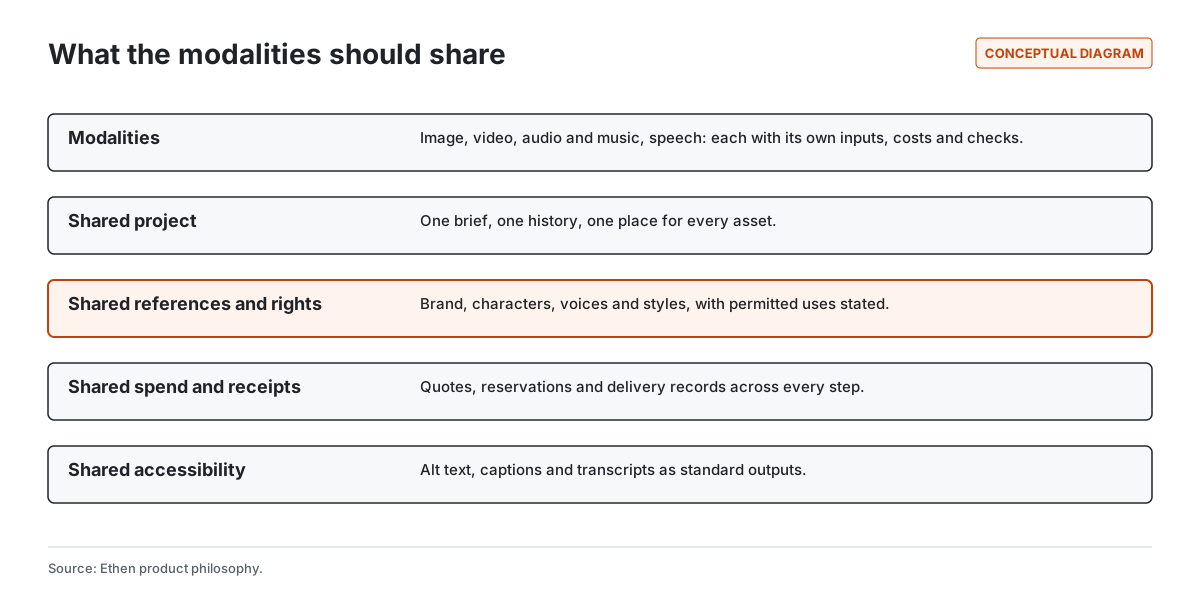
Treating the modalities as one system addresses all three. Figure 1 shows what should be shared.
What the modalities should share
One project. One brief, one history and one place for every asset, whatever its modality. When someone asks how a video was made, the answer should include the script, the voiceover, the images and the music, in one place.
One set of references and identities. Brand colors, logos, recurring characters, product images, styles and voices. A character should have one reference record that applies when generating its image, animating it and giving it a voice.
One record of rights. Every reference carries what it may be used for. A brand asset may be used freely within the brand's own work. A real person's likeness or voice may be used only with their explicit permission, for stated purposes. Licensed music has license terms. The record should travel with the reference, so a workflow cannot quietly use a voice or face outside its permission.
One model for spend and receipts. Each step, in any modality, should be quoted before it runs, reserved against a budget, and recorded on delivery. Video and speech can be far more expensive than images, so a shared spending model is what keeps a multi-modality project predictable.
Shared accessibility outputs. Images should have alt text, video and audio should have captions and transcripts. These are not extras; accessibility standards such as the Web Content Accessibility Guidelines treat captions for recorded audio as a baseline requirement for web content.
What should stay different
Sharing a system does not mean pretending the modalities are the same. Figure 2 shows how they differ.
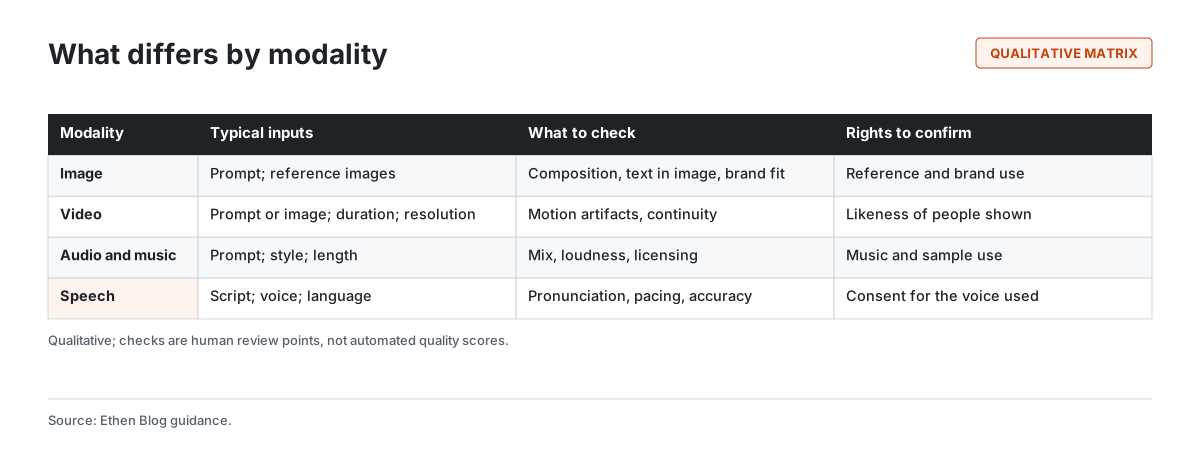
Inputs differ. An image edit needs a reference image. A video needs a duration and resolution chosen from what the model supports. Speech needs a script, a voice and a language. Validating these per modality, before anything runs, prevents wasted spend. Ethen Studio's published pipeline already validates image and video inputs this way; see Choosing Image and Video Models by Workflow.
Costs differ. Video and long-form audio generally cost more and take longer than images. Quotes need to reflect that per step.
Checks differ. There is no universal quality score across modalities. Images need checking for composition, legibility of any text and brand fit; video for motion artifacts and continuity; music for mix and licensing; speech for pronunciation, pacing and accuracy against the script. These are review points for people, not automated grades.
Rights concerns differ. Images raise questions about references and brands; video about the likeness of anyone shown; music about licensing; speech about consent for the voice.
Handoffs: where value and errors concentrate
Most multimodal projects are chains, and the handoffs between modalities are where things go right or wrong. Figure 3 shows a typical chain for a short product video.
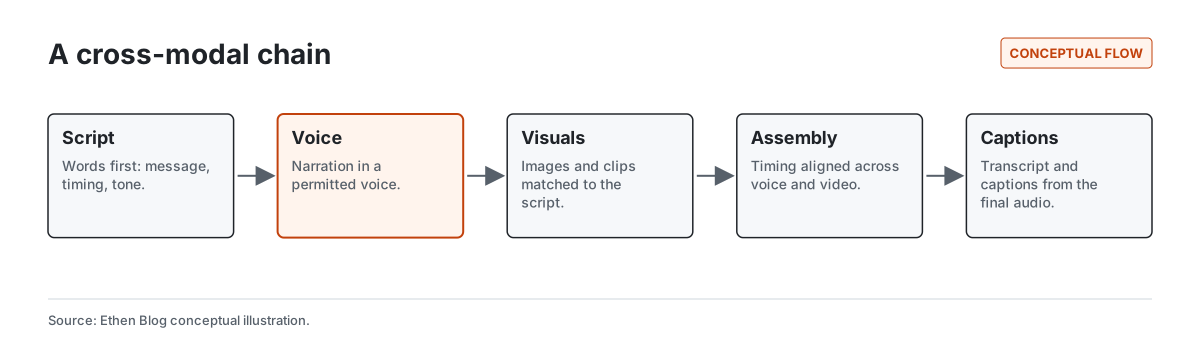
Script to voice. The narration must say exactly what the script says, in a voice the project has permission to use, with names and technical terms pronounced correctly.
Voice to visuals. Visual beats should match the narration's timing and content.
Visuals to assembly. Clips and images need to be sequenced and timed against the audio.
Audio to captions. Captions should come from the final audio, not the original script, so they match what is actually said. Speech recognition has become robust enough to make this practical — research such as the Whisper work on large-scale weakly supervised speech recognition showed strong transcription across many languages and conditions — but captions still deserve a human check, especially for names.
A system that carries context across these handoffs — the script available to the voice step, the timings available to the visual step, the final audio available to the captioning step — removes most of the copy-and-paste work and most of the mismatches.
Consistency across modalities
Keeping a character or brand consistent across image, video and voice is one of the hardest problems in multimodal creative work. A shared reference record helps: one description, one set of reference images, one permitted voice, applied at every step. It does not guarantee consistency, because models vary in how faithfully they follow references, but it removes the most common cause of inconsistency — different references used in different tools.
We describe how references and choices carry through Studio workflows in Why Ethen Studio Is Becoming More Workflow-Oriented.
Rights, likeness and voice
Generated media raises rights questions that text rarely does. Faces and voices belong to people. Using a real person's likeness or a cloned voice without permission can harm them and expose the creator to legal risk. Public discussion of voice cloning has highlighted how little audio can be needed to imitate a voice, and how rarely tools record consent.
Our position is that likeness and voice require explicit rights, recorded with the reference and checked before use; that a voice or face should never be used outside its stated permission; and that the record should be reviewable. Provenance helps, too: industry standards for content credentials, such as the C2PA specification, provide a way to attach information about how media was made to the files themselves.
Planning a multimodal project
A few planning steps prevent most problems in projects that cross modalities.
Write the words first. Most multimodal projects are driven by language: a script, a message, a set of captions. Settling the words before generating media avoids regenerating expensive video and audio when the message changes.
Decide the deliverables. List every output — formats, durations, languages, caption files — before starting. Different deliverables need different steps, and some steps can be shared.
Gather references and confirm rights up front. Collect brand assets, character references, the voice to be used and any music, and confirm permission for each before generating anything. Discovering a rights problem after a video is finished is the most expensive way to find it.
Budget by modality. Video and speech usually dominate the cost of a project. Quote those steps early so the total is known before work begins.
Plan human checkpoints. Choose where a person will review: the script, the voice sample, the key visuals and the final captions are typical points.
Common pitfalls
Regenerating instead of editing. Starting a visual from scratch when only one element needs to change loses consistency with earlier assets.
Captioning from the script. Narration often drifts from the script during production. Captions should come from the final audio.
Mismatched timing. Visuals generated without the narration's timing rarely line up. Generate visuals after the voice, or adjust the voice to fixed visual beats.
Unrecorded permissions. A voice or face used once with permission is often reused later without it, because nobody wrote the permission down with the asset.
Treating each modality's output as final. Every modality has its own failure modes, from garbled text in images to mispronounced names in speech. Each needs its own check.
What exists today, and what is direction
Today. Ethen Studio's published durable pipeline qualifies four image and video workflows — text-to-image, image editing, text-to-video and image-to-video — with input validation, quotes and reservations before work runs, delivery receipts, and reconciliation when an outcome is uncertain. See Building Durable Image and Video Jobs in Ethen Studio. Ethen's catalog includes audio, speech and music model families alongside image and video, as described in What 1,499 AI Endpoints Taught Us About Model Catalog Design. Separately, Ethen Chat supports realtime voice conversation, described in How Voice Fits Into the Ethen Experience.
Direction. Speech and audio generation inside Studio workflows, shared reference records with rights across modalities, cross-modal handoffs, and accessibility outputs as standard deliverables. These are not announced features, and we are not giving dates.
A worked example
The following example is illustrative. A software company wants a 30-second explainer video for a new feature.
The project starts with a brief and a script. The narration is generated in a synthetic voice the company has licensed for its brand, with permission recorded on the voice reference. The product screenshots and brand illustrations are generated and edited from the company's reference assets. Short clips animate two of the illustrations. The clips are timed to the narration. Captions are generated from the final narration audio and checked by a person, who corrects one product name. Alt text is written for the still images used on the landing page.
Every step was quoted before it ran. The final record shows the script, the voice and its permission, every image and clip with its references, the captions, and the total spend. When the feature changes next quarter, the team edits the script and reruns the chain.
Tradeoffs and limitations
One system can be heavier than one tool. For a single image, a whole project is unnecessary. The system should stay light for simple tasks.
Consistency is not guaranteed. Shared references reduce inconsistency but cannot eliminate it.
Rights records do not replace agreements. They help teams honor permissions; legal agreements define them.
Much of this is direction. Studio's published pipeline covers image and video workflows; speech and audio within Studio, and cross-modal workflows, are not announced.
FAQ
Can one AI tool handle images, video and voice together? Some tools offer several modalities. What matters more is whether they share a project, references, rights and records, so work stays consistent and traceable across modalities.
How do I keep a character consistent across image, video and voice? Use one reference record — description, reference images and a permitted voice — at every step, and edit from chosen outputs rather than regenerating from scratch.
What rights do I need to use an AI voice? Permission from the person whose voice it is, or a license for a synthetic voice, for the specific use. Record the permission with the voice and check it before each use.
Should AI-generated video have captions? Yes. Captions are a baseline accessibility requirement for recorded media on the web, and they should be generated from the final audio and checked.
Does Ethen Studio generate speech and music? Studio's published pipeline covers image and video workflows today. Speech and audio within Studio are direction, not announced features.
Related reading
- Why Ethen Studio Is Becoming More Workflow-Oriented
- Ethen Studio: From Model Catalog to Creative Workspace
- Building Durable Image and Video Jobs in Ethen Studio
- How Voice Fits Into the Ethen Experience
- Choosing Image and Video Models by Workflow
References
- Coalition for Content Provenance and Authenticity. C2PA Technical Specification. https://c2pa.org/specifications/
- W3C. Web Content Accessibility Guidelines (WCAG) 2.2, Success Criterion 1.2.2 Captions (Prerecorded). https://www.w3.org/TR/WCAG22/
- Radford, A., Kim, J. W., Xu, T., Brockman, G., McLeavey, C., & Sutskever, I. (2022). Robust Speech Recognition via Large-Scale Weak Supervision. arXiv:2212.04356. https://arxiv.org/abs/2212.04356
- Ethen Blog. Building Durable Image and Video Jobs in Ethen Studio. https://upcube.ai/blog/building-durable-image-and-video-jobs-in-ethen-studio