How Voice Fits Into the Ethen Experience
A voice AI assistant for work is most useful when it is the same assistant you already type to, not a separate one. In Ethen, voice is a way in: you talk instead of type, but you work with the same account, the same projects, the same permissions and the same approval steps. Voice is strongest for thinking out loud, capturing ideas and tasks, asking quick questions and working when your hands or eyes are busy. Text and visual surfaces stay better for comparing options, reviewing code or tables, and approving anything consequential. This article explains where voice belongs in Ethen, what stays constant when you switch modes, how a voice session starts today, and what we are deliberately not promising.
A voice AI assistant for work is most useful when it is the same assistant you already type to, not a separate one. In Ethen, voice is a way in: you talk instead of type, but you work with the same account, the same projects, the same permissions and the same approval steps. Voice is strongest for thinking out loud, capturing ideas and tasks, asking quick questions and working when your hands or eyes are busy. Text and visual surfaces stay better for comparing options, reviewing code or tables, and approving anything consequential. This article explains where voice belongs in Ethen, what stays constant when you switch modes, how a voice session starts today, and what we are deliberately not promising.
Key takeaways
- Voice is a mode, not a separate product island. It should share context, rules and records with everything else you do in Ethen.
- Voice is best for low-effort input. Thinking aloud, capture and short questions benefit most.
- Screens are better for review. Anything you need to compare, scan or check precisely belongs on a visual surface.
- Consequential actions get confirmed where you can see them. Voice can ask for an action; the exact action is reviewed on a screen.
- Trust starts before the first word. In Ethen Chat, a voice session starts with server-side checks, a short-lived pass and no tools.
What is a voice AI assistant for work?
A voice AI assistant for work is an assistant you can speak to and hear back from while doing real tasks: planning, drafting, researching, organizing and acting on your behalf. The difference from a consumer voice assistant is not the microphone. It is the context. A work assistant needs to know which project you are in, what you were doing a minute ago, what it is allowed to touch and what happens to what you said.
Voice models have improved quickly. In 2026, several providers moved from chained pipelines — speech to text, then a language model, then text to speech — toward systems that listen and speak more directly, with faster responses and better handling of interruptions. That progress makes voice more pleasant to use. It does not answer the product questions: where should voice live, what should it be able to do, and how should it relate to the rest of your work?
Those product questions are the subject here. The feel of a voice conversation — pacing, interruption, presence — is covered in a companion piece, What We Want Ethen Voice to Feel Like.
Where voice actually helps at work
Voice helps most when the cost of typing is higher than the cost of speaking, and when the answer does not need to be looked at closely. Four situations stand out.
Thinking out loud. Many people think better by talking. Early in a piece of work — shaping a plan, finding the structure of a document, working out what a problem actually is — speaking is faster and less self-censoring than typing. An assistant that listens, asks a clarifying question and reflects back a summary can turn ten minutes of rambling into a usable outline.
Capture. Ideas, tasks and follow-ups arrive at inconvenient moments: walking between meetings, cooking, driving, holding a child. Saying "add a task to follow up with the supplier on Thursday" is easier than opening an app and typing it. Capture is also forgiving: if the assistant gets a word wrong, you fix it later on a screen.
Quick questions. Short factual or procedural questions — what was the deadline we agreed, how do I convert this unit, what did the last message from the client say — work well by voice because the answer is short enough to hear once and remember.
Hands-busy and eyes-busy work. Some work happens away from a keyboard: on a factory floor, in a lab, at a workbench, during a site visit. Voice lets people consult or update their work without stopping what they are doing.
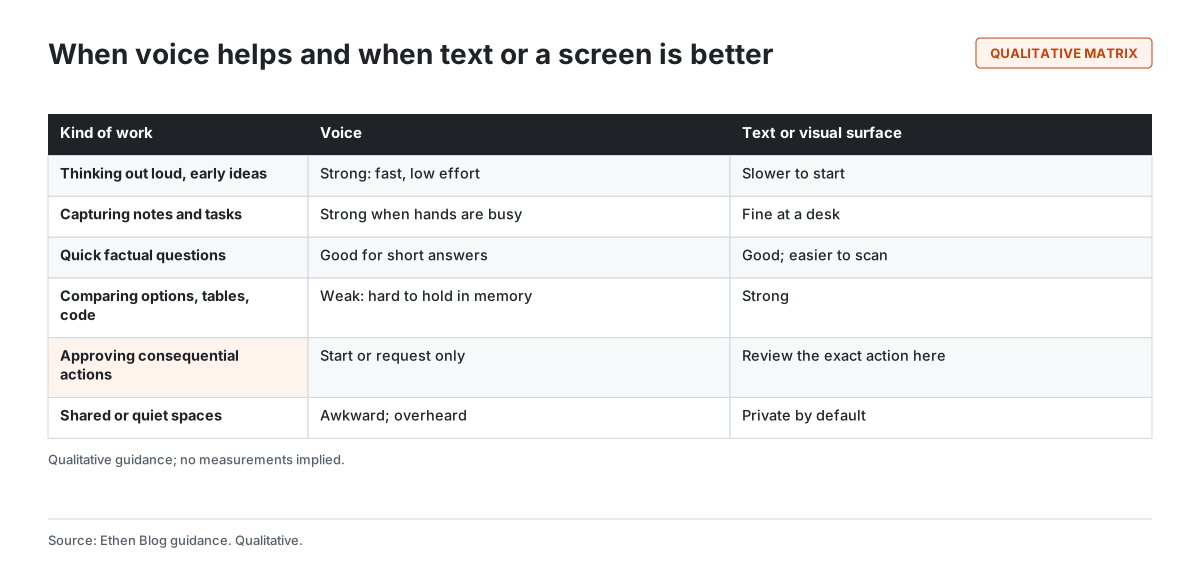
What these situations share is that voice reduces the effort of input, and the output is either short or will be reviewed later. Figure 1 sets this against the situations where voice is weaker.
Where voice gets in the way
Voice is a poor fit when the work depends on seeing many things at once. Speech is serial: you hear one thing after another and have to hold earlier parts in memory. That is fine for a short answer and hard for a comparison of five vendors across six criteria, a diff of two contract clauses, a table of numbers or a block of code. Those belong on a screen, where your eyes can move back and forth.
Voice is also awkward in shared spaces. Open offices, trains and quiet libraries make speaking aloud either rude or revealing. Anything confidential spoken in a shared space may be overheard, whatever the software does with it.
And voice is a weak channel for precision. Names, numbers, email addresses and technical terms are easy to mishear in both directions. An assistant that reads back "sending to j dot smith at…" is doing the right thing, but a screen that shows the exact address is better.
Voice is a way in, not a separate assistant
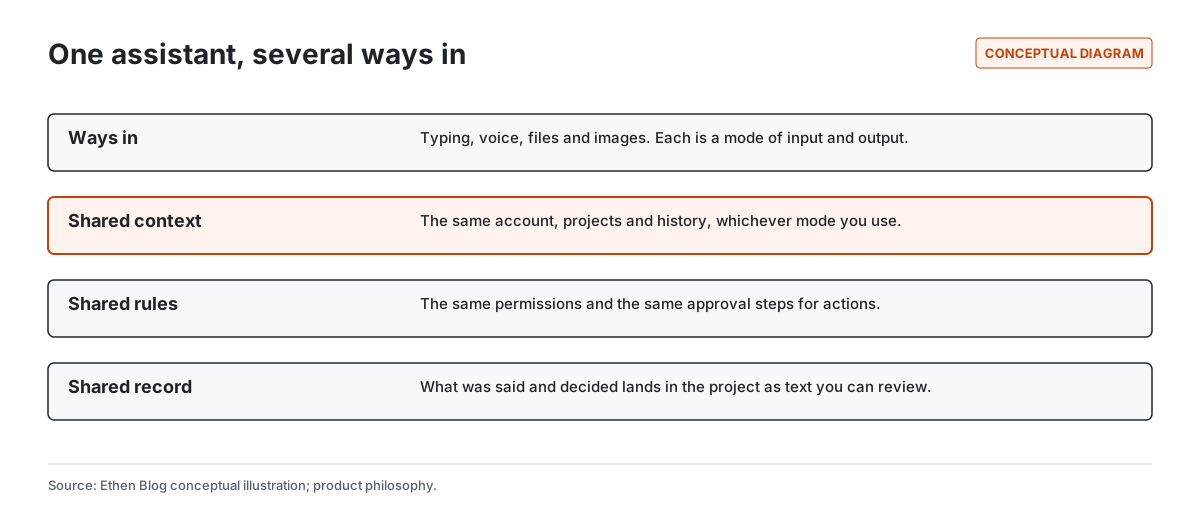
The most important design decision about voice in Ethen is that it is not a separate assistant. When you switch from typing to talking, you are still in the same Ethen: the same account, the same projects, the same history and the same rules. Figure 2 shows the idea.
This matters for three practical reasons.
Context should follow you. If you were reading a report in a project and then start talking, the assistant should be able to work with that project rather than starting from nothing. Equally, if you capture tasks by voice on your phone, they should appear in the project when you sit down at your desk. A voice mode that forgets everything or stores conversations somewhere you cannot find them creates a second, disconnected workspace — exactly what Ethen tries to avoid. Our wider thinking on this is in Rethinking AI Memory Across Ethen.
Rules should not change with the input method. Permissions do not loosen because you are speaking. If a project is not shared with you in text, it is not available by voice. If an action needs approval when you type the request, it needs the same approval when you speak it. Voice is not a back door.
Decisions should leave a record. Spoken conversations are easy to lose. When you make a decision by voice — "let's go with the second option" — that decision should land in the project as text you can review, search and correct. The spoken exchange is the conversation; the written record is what the work remembers. That principle connects to a broader idea in Ethen's research: that context should preserve the evidence behind a decision, not just the conclusion, as discussed in Evidence-Preserving Context.
Moving between voice and text
If voice is one way in among several, the handoffs between modes become the main experience. Three handoffs matter most.
From voice to screen. When an answer is too long or too detailed to hear comfortably, the assistant should say so briefly and put the detail on the screen: "I've put the comparison in the project; the short version is that the second option is cheaper but slower." Speaking a full table aloud is a failure of design, not a feature.
From screen to voice. When you are looking at something and want to talk about it, you should not have to describe it again. "What do you think of this paragraph?" should work if the paragraph is what you are looking at, within the permissions that apply to it.
From one device to another. Voice is often used away from the desk. What you say on a phone during a walk should be available on a laptop later, as text, in the right project. That is part of the larger picture of Ethen across desktop, web and local AI: the surface changes, the work does not.
A good test for the handoffs is to ask what happens after the voice conversation ends. If the useful parts — decisions, tasks, notes, drafts — are in the project as reviewable text, the handoff worked. If they exist only as an audio memory, it did not.
Voice and actions: ask by voice, confirm where you can see
The hardest question for any voice AI assistant for work is what it should be allowed to do on your behalf. Sending a message, changing a document, booking something or running a task all have consequences. Voice makes requesting those actions easy, which is useful, and also makes it easy to request them carelessly or to be misheard.
Ethen's approach to actions is the same in every mode: consequential actions need a clear, specific approval, and the approval should be for the exact action that will run. We have written about why in Why Ethen Keeps Human Approval in the Loop. For voice, the practical consequence is a simple rule of thumb: you can ask for an action by voice, but the exact action — the recipient, the wording, the amount, the file — is reviewed where you can see it.
This is not distrust of voice. It is a recognition that "send it" spoken aloud is ambiguous in a way that a button next to the exact message is not. Low-stakes, easily reversible actions, such as adding a note or a reminder to your own project, can reasonably happen by voice with a spoken confirmation. Actions that affect other people, spend money, or are hard to undo should come to a screen. Where the line falls will be refined with use, and it will be visible rather than hidden.
How a voice session starts in Ethen Chat today
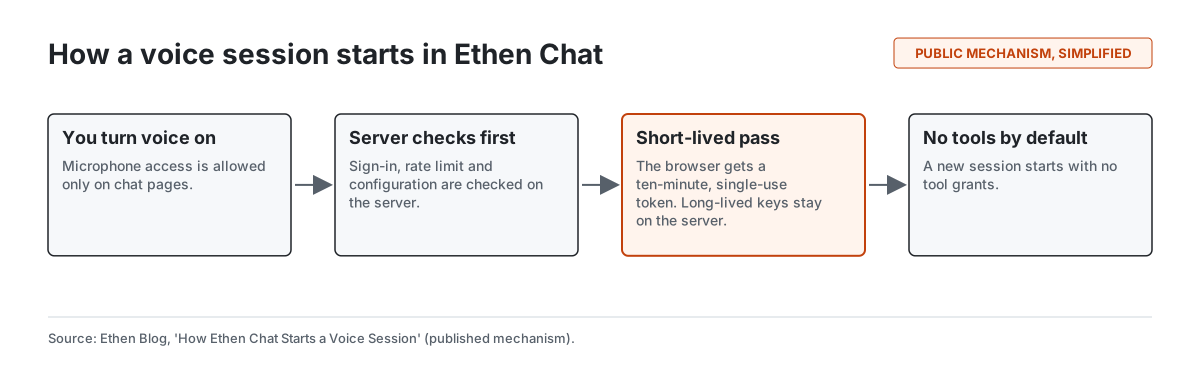
Trust in a voice assistant starts before the first word is spoken. Ethen Chat includes a voice session mechanism, which we described in detail in How Ethen Chat Starts a Voice Session. Figure 3 is a simplified version.
Four points from that mechanism are worth highlighting for anyone evaluating voice at work.
The microphone is scoped. Browsers support a Permissions Policy that lets a site say which pages may ask for the microphone. Ethen Chat allows microphone access on chat pages and disallows it elsewhere on the site. That limits where audio capture can even be requested.
The server decides first. Before any voice session begins, the server checks that you are signed in, that you are within a rate limit and that voice is configured for the deployment. If any check fails, no session starts.
The browser gets a short-lived pass, not a key. The browser receives a single-use token that expires after ten minutes. Long-lived credentials stay on the server. The browser also does not choose which model it talks to; that is decided on the server.
Sessions start with no tools. A new voice session begins with no tool grants. Anything beyond conversation has to be granted deliberately rather than inherited by default.
It is equally important to say what that engineering post did not establish. The release checks it describes verified the browser's microphone policy and the presence of the voice routes, but they did not include live microphone capture or a signed-in, end-to-end spoken conversation. We think that kind of precision about evidence matters, and it is why this article describes direction and principles rather than performance.
Privacy and voice
Voice raises privacy questions that text does not, because microphones can capture more than you intend: other people in the room, background conversations, things said before or after the part you meant. A responsible voice AI assistant for work should follow a few principles, and these are the ones Ethen holds.
Listening should be obvious. It should always be clear when the microphone is on, and turning it off should be one action.
Listening should be bounded. Voice should be something you start, not something that is always on in the background. The scoped microphone policy described above is one technical expression of this.
Purposes should be separate. Using what you say to answer you is different from storing it, and both are different from using it to improve models. Ethen's research on consent argues that these purposes should be granted separately rather than bundled. That argument, and its limits, is in Rights as Infrastructure, and our position on memory and training is in Why User-Controlled AI Memory Matters.
The record should be yours to review. If a voice conversation produces a transcript or notes, you should be able to see, correct and delete them.
These principles describe how we approach voice. Specific retention periods, storage locations and settings are product details that will be documented where they apply, and this article does not state them.
A worked example
The following example is illustrative. It shows how voice and screen might divide a single task, not a recording of a real session.
A project manager is walking back from a client meeting. They open Ethen on their phone and start talking: the client wants the launch moved by two weeks, the design review needs a new date, and someone should check whether the vendor contract allows the delay. The assistant asks one clarifying question — which design review — and then reads back a short summary: three follow-ups captured in the launch project.
Back at their desk, the manager opens the project. The three follow-ups are there as text. The assistant has drafted a message to the design lead proposing a new review date, but it has not sent it: sending a message to another person is a consequential action, so it waits on the screen for review. The manager edits one sentence and approves it. For the contract question, the assistant has found the relevant clause and put it on screen next to a plain-language summary, because reading a clause aloud would have been the wrong format.
Voice handled what it is good at: fast capture while walking. The screen handled review, precision and approval. The project holds the record of both.
How voice relates to the rest of Ethen
Voice sits within Ethen Chat today, and Chat is where most people will meet it. Over time, the same principle — one assistant, many ways in — applies across Ethen's family of apps. We explained why Ethen is organized as a set of specialized apps in Why Ethen Is a Family of Specialized AI Apps, and the direction for Chat itself in The Next Phase of Ethen Chat.
Ethen Voice is the name we use for voice as a product direction. This article does not announce availability, supported languages, devices or plans for Ethen Voice; those will be stated on the relevant product pages when they are true. Voice also features in the experience we described for My Ethen, where talking is one natural way among several to reach your assistant across devices.
Tradeoffs and limitations
Designing voice as a mode of one assistant, rather than a separate product, has costs.
Confirmation adds friction. Sending consequential actions to a screen is safer, and sometimes it will feel slower than saying "do it". We accept that friction for actions that matter and try to remove it for actions that do not.
Voice recognition is imperfect. Accents, background noise, technical vocabulary and names still cause errors. Read-backs and on-screen review reduce the damage but do not remove the errors.
Not everyone can or wants to use voice. People with some speech disabilities, people in shared spaces and people who simply prefer typing should never be at a disadvantage. Voice is an option, not a requirement, and nothing in Ethen should be reachable only by voice.
Evidence is still limited. As noted above, the published release checks do not include end-to-end spoken conversations. We will not claim voice quality or reliability results until they are measured.
FAQ
Is a voice AI assistant useful for work? Yes, for specific kinds of work: thinking out loud, capturing tasks and notes, quick questions and hands-busy situations. It is less useful for comparing options, reviewing detail or approving consequential actions, which are better done on a screen.
When should I talk to an AI instead of typing? Talk when speaking is easier than typing and the answer is short or will be reviewed later. Type, or look at a screen, when you need to see several things at once or get details exactly right.
Is voice in Ethen a separate assistant? No. Voice is a way of working with the same Ethen: the same account, projects, permissions and approval steps.
Can Ethen take actions from voice commands? You can ask for actions by voice. Consequential actions — those that affect other people, spend money or are hard to undo — are reviewed and approved where you can see the exact action.
What happens to what I say? The principles are that listening is visible and bounded, that purposes such as answering, storing and model improvement are separate, and that records are yours to review. Specific settings and retention details will be documented on the relevant product pages.
Related reading
- How Ethen Chat Starts a Voice Session
- What We Want Ethen Voice to Feel Like
- Why Ethen Keeps Human Approval in the Loop
- The Next Phase of Ethen Chat
- Why User-Controlled AI Memory Matters
- Ethen
References
- Stivers, T., Enfield, N. J., Brown, P., Englert, C., Hayashi, M., Heinemann, T., Hoymann, G., Rossano, F., de Ruiter, J. P., Yoon, K.-E., & Levinson, S. C. (2009). Universals and cultural variation in turn-taking in conversation. Proceedings of the National Academy of Sciences, 106(26), 10587–10592. https://doi.org/10.1073/pnas.0903616106
- Skantze, G. (2021). Turn-taking in conversational systems and human-robot interaction: A review. Computer Speech & Language, 67, 101178. https://doi.org/10.1016/j.csl.2020.101178
- W3C. Permissions Policy. Working Draft. https://www.w3.org/TR/permissions-policy/
- Ethen Blog. How Ethen Chat Starts a Voice Session. https://upcube.ai/blog/how-ethen-chat-starts-a-voice-session
- Ethen Research Lab (2026). Rights as Infrastructure: Building AI Datasets That Know How They May Be Used. Research note. https://upcube.ai/resources/research/rights-as-infrastructure
- Ethen Research Lab (2026). Evidence-Preserving Context: Compressing Agent Memory Without Losing Obligations. Research proposal; untested. https://upcube.ai/resources/research/evidence-preserving-context