Building Ethen Across Desktop, Web and Local AI
Ethen is being built across three kinds of surface because no single one is best at everything. The web is where Ethen is quickest to reach: conversation in Ethen Chat and cloud workspaces you can open from any browser. The Ethen desktop app is where Ethen can work with your local files, your own toolchain and local coding. Local AI models, reached through the desktop app, let some work run entirely on your own machine — useful for privacy, offline work and experimentation. What ties them together is not that every surface does everything, but one account, shared project state where it makes sense, and the same rules about memory and approvals everywhere. Each surface and device keeps only the access it needs. This article explains that design. It describes product direction and published engineering; it does not announce downloads, release dates or capabilities beyond those already described in Ethen's engineering posts.
Ethen is being built across three kinds of surface because no single one is best at everything. The web is where Ethen is quickest to reach: conversation in Ethen Chat and cloud workspaces you can open from any browser. The Ethen desktop app is where Ethen can work with your local files, your own toolchain and local coding. Local AI models, reached through the desktop app, let some work run entirely on your own machine — useful for privacy, offline work and experimentation. What ties them together is not that every surface does everything, but one account, shared project state where it makes sense, and the same rules about memory and approvals everywhere. Each surface and device keeps only the access it needs. This article explains that design. It describes product direction and published engineering; it does not announce downloads, release dates or capabilities beyond those already described in Ethen's engineering posts.
Key takeaways
- Different surfaces, different strengths. Web for reach, desktop for local files and tools, local models for keeping work on your machine.
- One capability, one owner. Each capability has a canonical home, even when it appears on several surfaces.
- Continuity through the account, not duplication. Projects, memory controls and approvals follow you; each surface does what it is suited for.
- Access stays scoped. A device or runtime gets only the permissions it needs, and local runtimes are reached only on your machine.
- Local AI is a choice, not a downgrade. It trades raw model size for control, privacy and offline availability.
Why does Ethen need more than one surface?
Ethen needs more than one surface because the work people bring to AI happens in different places. Some of it starts on a phone or in a browser tab and needs nothing but a conversation. Some of it lives in folders on a laptop: a code repository, a set of documents, a project that is not in any cloud service. Some of it involves information people would rather not send anywhere. A browser is excellent at the first, limited at the second, and depends on provider terms for the third.
Figure 1 summarizes the trade-offs.
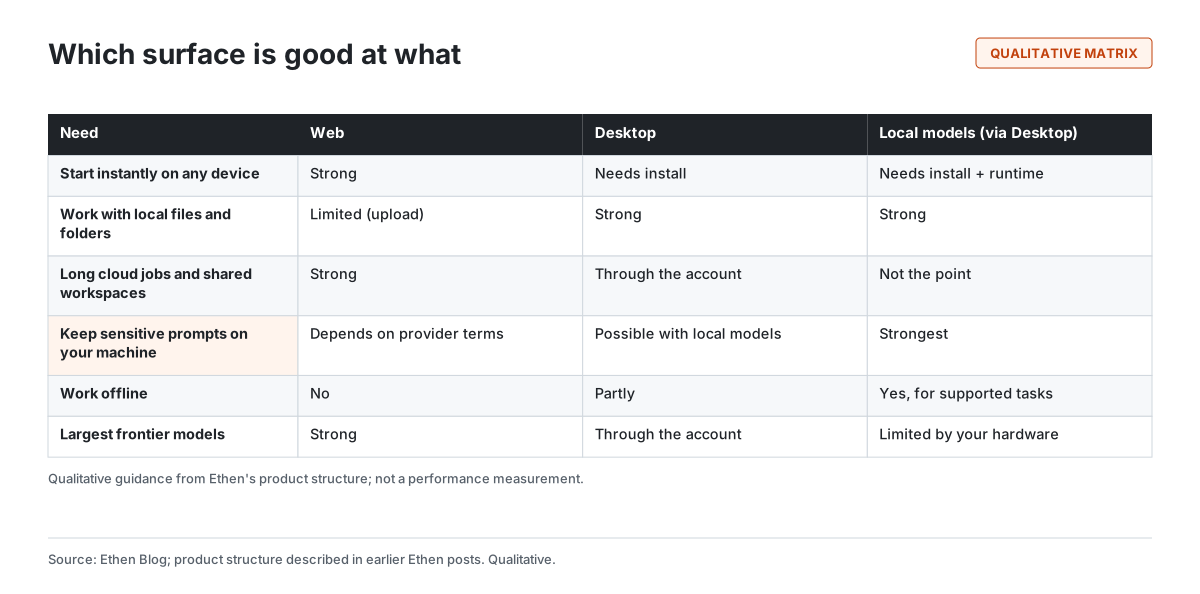
The web starts instantly on any device and hosts long-running cloud jobs and shared workspaces well. A desktop app can open local folders, run your own build tools and keep files where they already are. Local models can keep prompts and documents on your machine and keep working without a network connection, at the cost of the largest models, which need more hardware than most personal computers have. Choosing one surface would mean giving up something important for a large share of people's work.
What each surface is for
Each Ethen surface has a defined role, following the organizing rule that Ethen describes for its apps: one capability can appear in several places, but it should have one canonical owner and one shared backend and state. The broader reasoning is set out in Why Ethen Is a Family of Specialized AI Apps.
The web. Ethen Chat is the lightweight conversational product: questions, files, short tasks, quick help. Cloud workspaces on the web host heavier work that benefits from running on servers: longer coding jobs, research, and tasks that continue while you are away. The web is also where Ethen is easiest to try, because there is nothing to install.
The desktop app. The Ethen desktop app is the local workspace. It is where Ethen can work with folders on your machine and where local coding happens with your own tools. As described in Three Places to Use Ethen Code, Ethen Code is deliberately designed to appear in three places — light help in Chat, a full cloud workspace and a local desktop environment — as one system with three levels of experience rather than three separate products. That article describes target scope, not release availability, and the same caution applies here.
Local models. In Ethen's product structure, local models belong to the desktop app rather than to a web product. That is a deliberate choice: running a model on your own machine is inherently a local activity, and the desktop app is the component that can reach it safely. The underlying idea, processing sensitive work where it already lives rather than moving it, is one Ethen Research Lab also explores for enterprise evaluation in Tenant Replay, a research proposal that has not been built.
How local models fit
Local models fit into Ethen as an execution option inside the desktop app, not as a separate world. The published engineering detail is in How Ethen Desktop Talks to Local Models. The essential points are these. Local model runtimes are reached only on your own machine. The parts of the desktop app that handle privileged operations, such as reaching the local runtime, downloading a model or deleting one, are separated from the interface, which can only request a fixed set of named operations. And not every local runtime can do the same things: the desktop app treats one widely used runtime, Ollama, as the fully supported path, while runtimes that expose an OpenAI-compatible interface, such as LM Studio or a llama.cpp server, support a narrower set of operations.
That last point generalizes. "Supports local models" is not a single claim; it is a list of separate operations — check status, list models, download, delete, chat, generate embeddings — each of which a given runtime may or may not support. The capability-first way to choose between local and hosted options is laid out in Local AI or GPU Hosting: What to Check First. Why local models matter at all, when cloud models are larger and easier, is the subject of Why Local AI Still Matters in a Cloud-First World.
Continuity without duplication
Continuity across surfaces should come from your account and shared contracts, not from making every surface do everything (Figure 2).
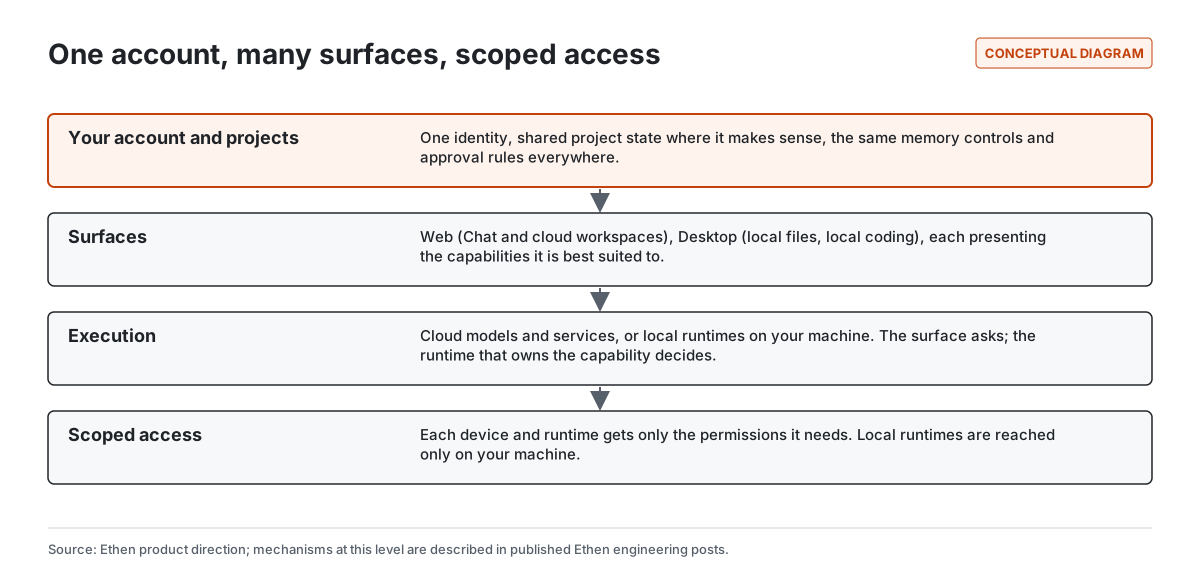
At the top is your account: one identity, your projects, and the controls over what Ethen remembers and what it may do on your behalf. Those should behave the same on every surface. A memory you deleted on the web should not reappear on the desktop. An action that needs your approval in one place should need it everywhere. Below that, each surface presents what it is suited to. Below that, the work runs either in the cloud or on a local runtime, and the component that owns a capability decides what is allowed. At the bottom, each device and runtime holds only the access it needs.
This is the same principle described for a personal Ethen experience in What We Want "My Ethen" to Feel Like: one you, many devices, each with only the access it needs. A lost laptop should be easy to cut off without disturbing your phone. A desktop app that can read a project folder should not thereby gain access to everything else on the machine.
What must stay the same on every surface
Some things should behave identically wherever you use Ethen, because inconsistency in them would undermine trust. Four matter most.
Memory controls. What Ethen remembers about you, and your ability to see, correct, scope and delete it, should not depend on which app you opened. A memory deleted on the web should be gone on the desktop too. The reasoning is in Why User-Controlled AI Memory Matters.
Approvals. If an action needs your approval because it is consequential — sending a message, spending money, changing something that is hard to undo — it needs that approval on every surface, bound to the exact action. A desktop app should not be a side door around an approval the web would require. The principles are in Why Ethen Keeps Human Approval in the Loop.
Visibility of what happened. Work should report what it did, what it checked and what is still unresolved in the same way regardless of where it ran, so that a task started on the desktop and finished in the cloud can be reviewed as one piece of work.
Cost. If work on a surface can spend money, on cloud models, compute or paid tools, that spending should be visible and bounded the same way everywhere. Local models change where computation happens, and therefore who pays for it, but they should not make costs harder to see.
How a capability gets a home
When a new capability is added, the first question is which surface should own it. The answer follows a few practical tests rather than a preference for any one platform. Does the capability need access to things that only exist on your machine, such as local folders, local tools or a local model runtime? Then it belongs on the desktop. Does it need to keep running for a long time, use large hosted models or be shared with other people? Then it belongs in a cloud workspace on the web. Is it a quick, conversational need that should start without friction? Then a lightweight version belongs in Ethen Chat, with a link to the fuller experience if one exists.
A capability can appear in more than one place, as Ethen Code does, but only one surface owns its full behavior and the others present a lighter version of the same system. That rule exists to prevent a familiar failure in software that grows by accretion: two or three slightly different implementations of the same feature, each with its own bugs, settings and data, none of which fully agree. Users experience that as unpredictability. One owner per capability is how Ethen intends to avoid it.
A task that moves between surfaces
Illustrative example — a hypothetical scenario, not a statement of shipped features.
Figure 3 sketches how one piece of work might move between surfaces.
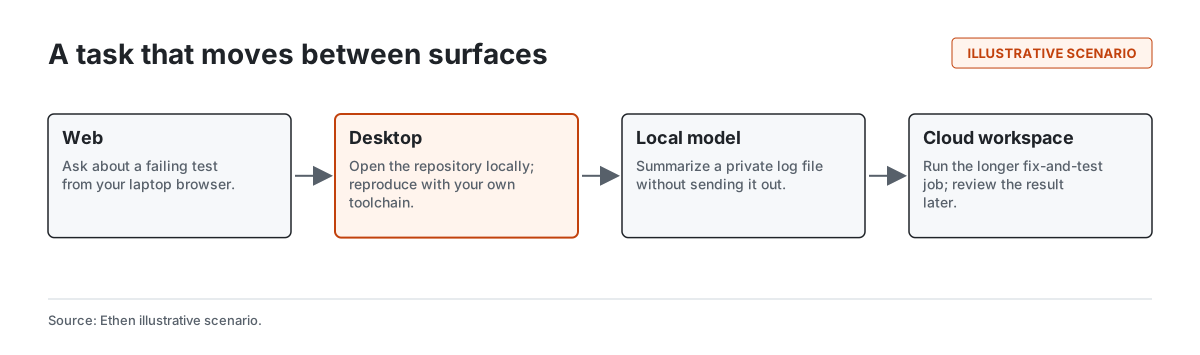
You notice a failing test while reading a build report in your browser and ask about it on the web. Back at your desk, you open the repository in the desktop app and reproduce the failure with your own toolchain. The failure produced a log file containing customer identifiers, so you ask a local model to summarize it without the file leaving your machine. Once the cause is clear, you hand a longer fix-and-test task to a cloud workspace, which keeps running while you do something else, and you review the result later from whichever device is nearest. The value is not that any one surface is impressive. It is that the work never has to be restarted, re-explained or copied by hand from one place to another.
Why this design is harder than one app
Building across several surfaces is harder than building one. Each surface needs its own interface work, its own testing and its own release process. Shared state has to stay consistent: if a project changes on one surface, the others must see the change, and conflicts must be resolved sensibly. Permissions must be enforced consistently across platforms with different security models. Desktop apps in particular need care, because a desktop application can reach far more of a computer than a web page can; established guidance for desktop frameworks recommends isolating privileged code from interface code and exposing only narrow, explicit operations (Electron). Ethen's published desktop design follows that pattern.
We accept that cost because the alternative is worse for users: either an assistant that cannot touch your local work, or one that does everything in one place with broad access to everything. Neither is what people need from AI they intend to rely on.
Tradeoffs and limitations
- Not everything is available everywhere. Some capabilities are deliberately limited on some surfaces. Light help in Chat is not the full coding workspace.
- Local models are smaller. Models that run on personal hardware are generally less capable than the largest hosted models, and quality varies across tasks.
- Runtime support varies. Local runtimes differ in which operations they support. Ethen's desktop app does not treat them as interchangeable.
- Installing software is friction. The desktop app and local runtimes require installation and updates that the web does not.
- This is direction plus published engineering. This article does not announce availability, release dates or pricing for any surface.
Frequently asked questions
Does Ethen have a desktop app? Ethen's product structure includes a desktop app for local files, local coding and local models. Its engineering is described in published Ethen posts. This article does not make a public availability claim.
Can I use Ethen without installing anything? Yes, through the web, which is designed to be the quickest way to use Ethen. Local files and local models need the desktop app.
Which local model runtimes work with Ethen? The desktop app's published design treats Ollama as the fully supported runtime and supports a narrower set of operations for OpenAI-compatible runtimes such as LM Studio and llama.cpp servers.
Does my data leave my computer when I use a local model? Work that runs entirely on a local model is processed on your machine. Tasks you hand to cloud models or cloud workspaces are processed by those services.
Related reading
- How Ethen Desktop Talks to Local Models
- Why Local AI Still Matters in a Cloud-First World
- Three Places to Use Ethen Code
- Ethen Local Models
- Ethen Code
References
- Electron. Security checklist (process isolation, context isolation, limiting exposed APIs). https://www.electronjs.org/docs/latest/tutorial/security
- Ollama. API reference. https://github.com/ollama/ollama/blob/main/docs/api.md
- llama.cpp. HTTP server (OpenAI-compatible API). https://github.com/ggml-org/llama.cpp/tree/master/tools/server
- Ethen Research Lab (2026). Tenant Replay: Private Evaluation Inside Enterprise Boundaries. Research proposal; not built. https://upcube.ai/resources/research/tenant-replay