The Next Phase of Ethen Chat
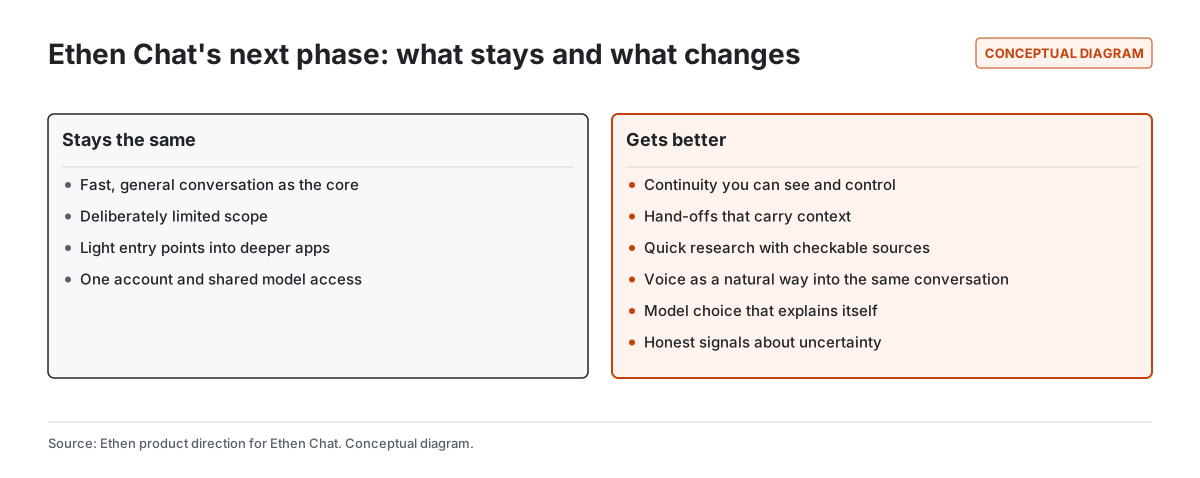
The next phase of Ethen Chat is about doing the same job better, not about doing more jobs. Chat stays Ethen's fast, general conversational front door, deliberately limited in scope. What changes is how well it carries context. We are working toward six improvements: continuity across sessions and devices that you can see and control; hand-offs that bring your context along when work outgrows a conversation; quick research answers whose sources you can check; voice as a natural way into the same conversation; model choice that explains itself; and honest signals about what Chat does not know. This article explains each direction, what already exists, and what we are not claiming. It contains no release dates.
The next phase of Ethen Chat is about doing the same job better, not about doing more jobs. Chat stays Ethen's fast, general conversational front door, deliberately limited in scope. What changes is how well it carries context. We are working toward six improvements: continuity across sessions and devices that you can see and control; hand-offs that bring your context along when work outgrows a conversation; quick research answers whose sources you can check; voice as a natural way into the same conversation; model choice that explains itself; and honest signals about what Chat does not know. This article explains each direction, what already exists, and what we are not claiming. It contains no release dates.
Key takeaways
- Chat stays focused. The scope boundary — conversation first, light entry points into deeper apps — is not changing.
- Continuity is the biggest gap to close. Useful memory across sessions, with controls to see, correct and delete it.
- Hand-offs should carry context. When a question becomes a project, the sources and files you already have should move with it.
- Sources should be checkable. Quick research in Chat should make it easy to see which source supports which claim.
- Voice joins the same conversation. Talking and typing should share context, not create separate silos.
- Model choice should be understandable. Automatic choice is useful only if it can explain itself.
What is Ethen Chat for, and what stays the same?
Ethen Chat is the conversational surface of Ethen: a place to ask questions, draft and revise, think through a decision, and get quick help from capable models. Its defined scope is core chat, a model selector, files, artifacts, tools and memory, plus deliberately limited versions of deeper work — a quick research mode, a curated creative entry point, light design help and light code help. Each limited entry point has a way out into the app that owns the full version. The reasoning is in Keeping Ethen Chat Focused.
That boundary is the foundation of the next phase, not something it relaxes. The temptation with any successful chat product is to keep adding modes until it becomes an everything app. We think that makes simple things slower and complex things fragile, which is why Ethen is organized as a family of specialized apps. The next phase makes Chat better at its own job and better at handing off what is not its job.
Who is Ethen Chat for?
Ethen Chat is for anyone who wants a capable conversational partner without first deciding which specialized tool they need. That includes people who use AI a few times a week to draft an email or understand a document, professionals who use it all day as a thinking partner, and developers who want a quick explanation before opening a repository. The common thread is that the work starts as a question.
That breadth is exactly why Chat has to stay simple. A product used by people with very different needs cannot assume everyone wants a project manager, a model laboratory or an agent console. It can assume everyone wants fast, honest answers, a conversation that remembers the right things, and an easy way to go further when they need to. The next phase is designed around those three needs. The deeper capabilities exist; they live one hand-off away, in the apps built for them.
1. Continuity you can see and control
The most common frustration with AI chat is starting over: re-explaining your role, your project, your preferences and the decision you made last week. Memory is already part of Chat's scope. The direction is to make it more useful and more visible at the same time.
Useful means Chat remembers the things that make the next conversation better — preferences you have stated, ongoing projects, facts you asked it to keep — and uses them without being reminded. Visible means you can see what Chat remembers, correct it when it is wrong, and delete it when you want it gone. Memory you cannot inspect is memory you cannot trust, and memory that silently drifts from what you told it is worse than none.
Continuity also means across devices. A conversation started on the web should be available on Desktop and the other way around, with the same account and the same memory controls. We describe how we are thinking about memory across all of Ethen in How We're Rethinking AI Memory Across Ethen, and why control matters in Why User-Controlled AI Memory Matters.
2. Hand-offs that carry context
Many conversations reach a point where they should become something else: a research investigation, a creative project, a code change, or a piece of work Ethen should go and do. Today, moving across that boundary often means copying and pasting. The direction is for Chat to recognize those moments, suggest the right place for the work, and carry the context with it — the question, the sources found so far, the files you shared, and the decisions you already made.
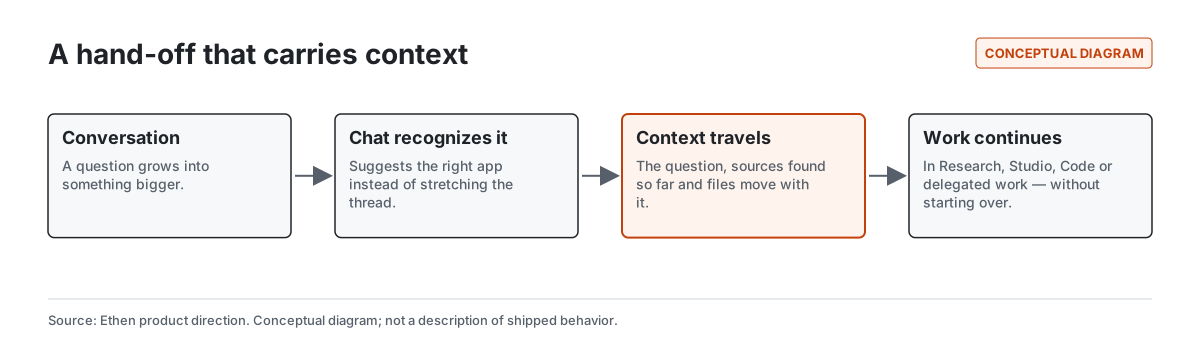
A good hand-off is a suggestion, not a forced redirect. Some people want to keep a long exploratory conversation in Chat, and that is fine. The point is that when you do move, you should not start from zero. This is also how the family of apps keeps feeling like one Ethen: shared account, shared context, one owner per kind of work.
3. Quick research with checkable sources
Chat includes a limited research mode: ask a question, let Chat run a research pass, and get an answer or short report with sources and citations. It is designed for questions that resolve in one sitting. The direction is to make those answers easier to check — to make it obvious which source supports which claim, to show where sources disagree, and to say when the evidence is thin.
Research that needs to persist — branching lines of inquiry, a growing set of sources, notes you want to revisit — belongs in the full Ethen Research app, and Chat should hand it there with its sources attached. Our guide Checking the Evidence in an AI Research Report describes what to look for in any AI-generated report, including ours.
4. Voice as a way into the same conversation
Talking is often faster than typing, and sometimes it is the only practical option. Chat already starts voice sessions in a way designed for safety: the session is authorized on the server, the browser receives only a short-lived credential, and the model used for voice is chosen by the deployment rather than by the browser. That mechanism is described in How Ethen Chat Starts a Voice Session, including the limits of its testing.
The direction is for voice to be a natural way into the same conversation rather than a separate mode with its own memory. What you said aloud should be available when you return to typing, and the other way around. Voice also needs its own interaction quality — fast responses, natural turn-taking, the ability to interrupt, and clear confirmation before anything consequential happens. We cover where voice fits in Ethen in How Voice Fits Into the Ethen Experience.
5. Model choice that explains itself
Chat's model selector includes an automatic option backed by Faros, Ethen's intelligence layer, which resolves to a default model for the conversation. Automatic choice is valuable because most people do not want to evaluate models before asking a question. It is only trustworthy if it can explain itself: which model answered, and why that one.
We also want the selector itself to be clearer. Chat is meant to offer a curated set of choices, with the full catalog living elsewhere. Our own write-up of Chat's scope notes that the current picker lists more models than that curated design intends, including some entries that are catalog information rather than models Chat can run. Bringing the picker back in line with the design — a short, honest list, with a clear path to the full catalog — is part of this phase. How we think about model choice more broadly is in Making AI Model Choice Less Confusing.
6. Honest signals about uncertainty
A conversational answer always sounds confident, because fluent text does. That is a design problem, not just a model problem. The direction for Chat is to show uncertainty where it matters: when sources are thin or conflicting, when a figure could not be verified, when a request was outside what Chat could check. The goal is not to cover answers in disclaimers. It is to make the few warnings that appear worth reading. We explain the principle across Ethen in Why Ethen Shows What It Knows—and What It Doesn't.
Speed is a feature
Every improvement above has to respect the thing that makes Chat useful in the first place: it is fast. Human-computer interaction research has long distinguished responses that feel instantaneous, delays that people notice but tolerate without losing their train of thought, and waits long enough that attention wanders and progress feedback becomes necessary (Nielsen, 1993). Memory lookups, source checks and hand-offs all add work. The design constraint is that this work should happen without making ordinary conversation feel slower, and that anything genuinely slow should move into a surface built for longer work.
What does this look like in practice?
Illustrative example — describes the intended experience, not shipped behavior.
You ask Chat to help you think through switching your team's project-tracking tool. Chat remembers that you lead a twelve-person design team and that you mentioned budget constraints last month — and shows you that it is using those facts, so you can correct them. It gives you a quick, sourced comparison of three options, marking one pricing figure as unverified because the vendor's page was ambiguous. You ask it to "turn this into a proper evaluation I can share with my manager". Chat suggests moving the work into a research project, carrying over the question, the three options and the sources it already found. Later, walking between meetings, you ask a follow-up by voice, and the answer draws on the same conversation.
How will we know the next phase is working?
We will judge this phase by behavior that reflects real usefulness rather than by engagement. Spending more time in Chat is not a goal; finishing what you came to do is. The signals we care about are qualitative and directional: whether people need to repeat context less often, whether they correct or delete remembered facts (a sign that memory is visible, and a prompt to make it more accurate), whether hand-offs are accepted and the work continues in the destination app, whether people open the sources behind research answers, and whether automatic model choices are trusted or overridden. Each of those tells us something different. None of them, on its own, is a target to maximize, and we will not publish them as performance claims without the evidence to support them.
What we are not claiming
This article describes direction for Ethen Chat. It does not announce features, release dates, availability by plan or performance measurements. Where we describe an existing mechanism — the scope boundary, the voice session start, the automatic model option — we link to the post that describes it and its limits.
Tradeoffs
Better memory raises privacy questions, which is why visibility and deletion come with it rather than after it. Hand-offs add decisions, and a hand-off suggested too often becomes noise. Showing uncertainty can make good answers look weaker if it is overused. And every capability added to Chat pushes against its scope; the discipline is to improve how Chat starts and carries work while leaving the full versions of deeper work to the apps that own them.
Frequently asked questions
Is Ethen Chat getting more features? Mostly it is getting better at what it already does — continuity, sourcing, voice and model choice — and better at handing off work that belongs elsewhere.
Does Ethen Chat remember previous conversations? Memory is part of Chat's scope. The direction is to make memory more useful and fully visible, with controls to correct and delete it.
Can Ethen Chat do deep research? Chat includes a limited research mode for questions that resolve in one sitting. Research that needs to persist belongs in the full Ethen Research app.
Which model does Ethen Chat use? You can choose a model or use the automatic option, which resolves to a default model. The direction is for automatic choices to explain which model answered and why.
Related reading
- Keeping Ethen Chat Focused — Chat's scope and boundaries.
- How Ethen Chat Starts a Voice Session — the implemented voice mechanism.
- AI Agents and Autonomous Work — where longer work goes when it leaves Chat.
References
- Nielsen, J. (1993). Response Times: The 3 Important Limits. Nielsen Norman Group. https://www.nngroup.com/articles/response-times-3-important-limits/
- Amershi, S. et al. (2019). Guidelines for Human-AI Interaction. Proceedings of CHI 2019. https://www.microsoft.com/en-us/research/publication/guidelines-for-human-ai-interaction/
- Ethen Blog (2026). Keeping Ethen Chat Focused. https://upcube.ai/blog/keeping-ethen-chat-focused
- Ethen Blog (2026). How Ethen Chat Starts a Voice Session. https://upcube.ai/blog/how-ethen-chat-starts-a-voice-session
- Ethen Blog (2026). Checking the Evidence in an AI Research Report. https://upcube.ai/blog/checking-the-evidence-in-an-ai-research-report