What Is an AI Workspace? A Better Way to Think About It
An AI workspace is a persistent place where people and AI systems work on something together. It holds six things a conversation does not: the context the work depends on, the artifacts being made, the state of the work (done, pending, blocked, unknown), the tools and permissions the AI may use, the people who own and review the work, and the history and evidence of what happened. A chat window can be one way to interact with a workspace, but it is not the workspace itself. The practical test is simple: if you closed the conversation, would the work still be there, organized, and checkable? If not, you were using a chat, not a workspace.
An AI workspace is a persistent place where people and AI systems work on something together. It holds six things a conversation does not: the context the work depends on, the artifacts being made, the state of the work (done, pending, blocked, unknown), the tools and permissions the AI may use, the people who own and review the work, and the history and evidence of what happened. A chat window can be one way to interact with a workspace, but it is not the workspace itself. The practical test is simple: if you closed the conversation, would the work still be there, organized, and checkable? If not, you were using a chat, not a workspace.
Key takeaways
- A conversation holds messages; a workspace holds the work. The difference matters as soon as work spans sessions, people or tools.
- Six components define a workspace: context, artifacts, state, tools and permissions, people, and history with evidence.
- The central artifact decides the shape. A diff, a canvas, a source map and a job timeline need different views.
- Chat is an interaction mode, not a container. It is excellent for starting and steering work, and poor at holding it.
- Good workspaces make work checkable. Anyone should be able to see what was done and how it was verified.
What is the difference between an AI workspace and a chatbot?
A chatbot is organized around turns: you write, it replies. Everything it knows about your work lives in the scrollback, and everything it produces is a message. That shape is ideal for asking questions, drafting, thinking aloud and getting quick help. It breaks down when the work becomes something you need to come back to, share, review or rely on.
An AI workspace is organized around the work itself. The report, the codebase, the campaign or the delegated task is the center, and conversation is one of several ways to act on it. When you return tomorrow, you return to the work's current state, not to the bottom of a long thread. When a colleague joins, they see the artifacts and the decisions, not a transcript they have to read from the top.
The distinction is not about features. Many chat products add file uploads, memory or projects; many workspaces include a chat panel. The question is which one is the container. If the work lives in the conversation, it inherits the conversation's limits.
What does an AI workspace hold?
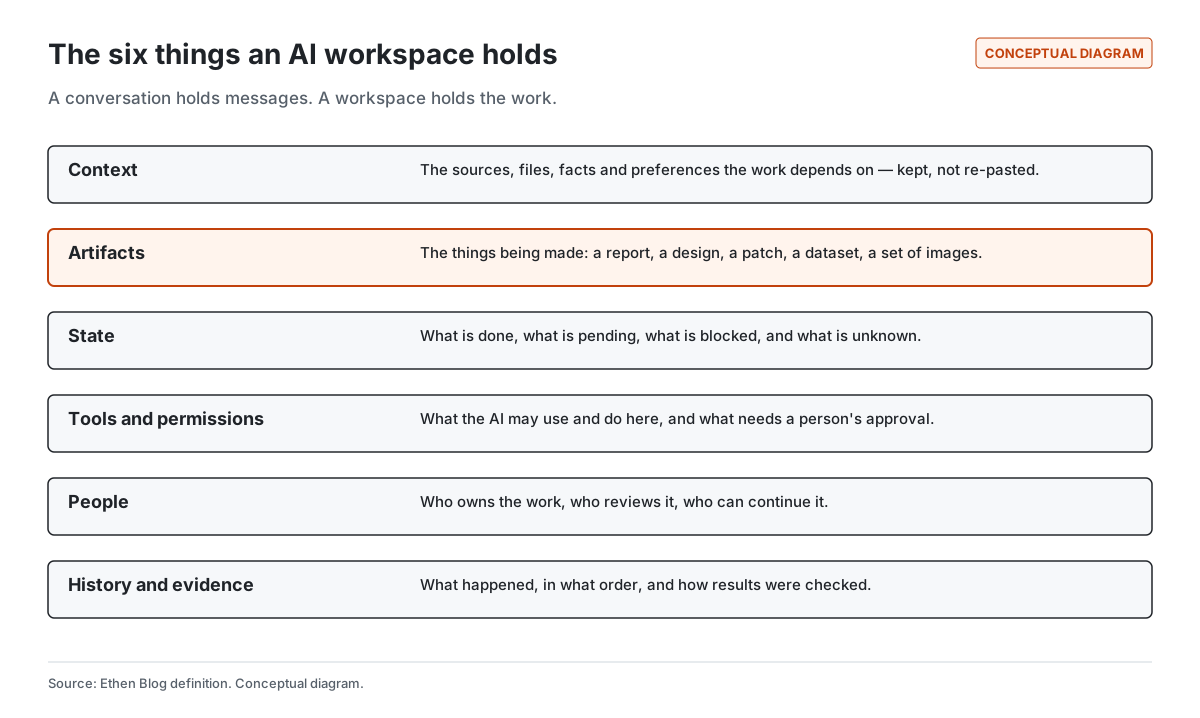
An AI workspace holds six things, each of which solves a specific way that conversation-only work breaks down.
1. Context
Context is the material the work depends on: source documents, files, data, prior decisions, preferences and constraints. In a chat, context is whatever is in the thread, and long threads are an unreliable store. Models can miss information placed in the middle of long inputs (Liu et al., 2023), and compressing a long conversation to fit a model's limit can drop instructions that were stated once and meant to apply throughout. A workspace keeps important context as organized, retrievable material rather than relying on it surviving in a transcript. Ethen Research Lab's proposal Evidence-Preserving Context argues that obligations, permissions and deadlines in particular should be kept in a protected structure that is never summarized away; it is a research proposal that has not been tested.
2. Artifacts
Artifacts are the things being made: a research memo, a slide deck, a set of images, a code change, a spreadsheet. In a chat, artifacts are messages or attachments, scattered across turns and versions. In a workspace, the artifact is the center: it has a current version, a history of changes, and a place where it can be reviewed and edited directly rather than regenerated from scratch.
3. State
State is the answer to "where are we?": what is finished, what is in progress, what is waiting on a person, what is blocked, and what is unknown. Conversations have no state beyond "the last message". For short work that is fine. For work that takes hours, involves several steps or runs while you are elsewhere, explicit state is what lets you check progress at a glance and resume after an interruption. We explore why longer work needs this in Why Long-Running AI Work Needs a Different UX Than Chat.
4. Tools and permissions
A workspace defines what the AI may use and do there: which files and systems it can read, which actions it can take, what it may spend, and which steps need a person's approval. In a chat, permissions are usually account-wide and implicit. In a workspace, they can be scoped to the work — a research project can read sources without being able to send email; a code workspace can run tests without being able to deploy.
5. People
Real work involves more than one person: someone who owns it, someone who reviews it, someone who picks it up next week. A workspace makes the work legible to all of them and records who decided what. A conversation is usually private to the person who started it and hard for anyone else to enter.
6. History and evidence
History is the record of what happened, in order. Evidence is how results were checked: sources linked to claims, tests run against code, approvals granted for actions, observations confirming that an effect happened. A workspace keeps both, so the question "how do we know this is right?" has an answer that does not depend on trusting the AI's summary.
Why does the central artifact matter so much?
The central artifact matters because it decides what the workspace must show to make progress visible. A research workspace is organized around claims and the sources that support them. A creative workspace is organized around assets and their versions. A code workspace is organized around a diff and the checks that ran against it. A delegated task is organized around a plan, a status and the decisions waiting for a person.
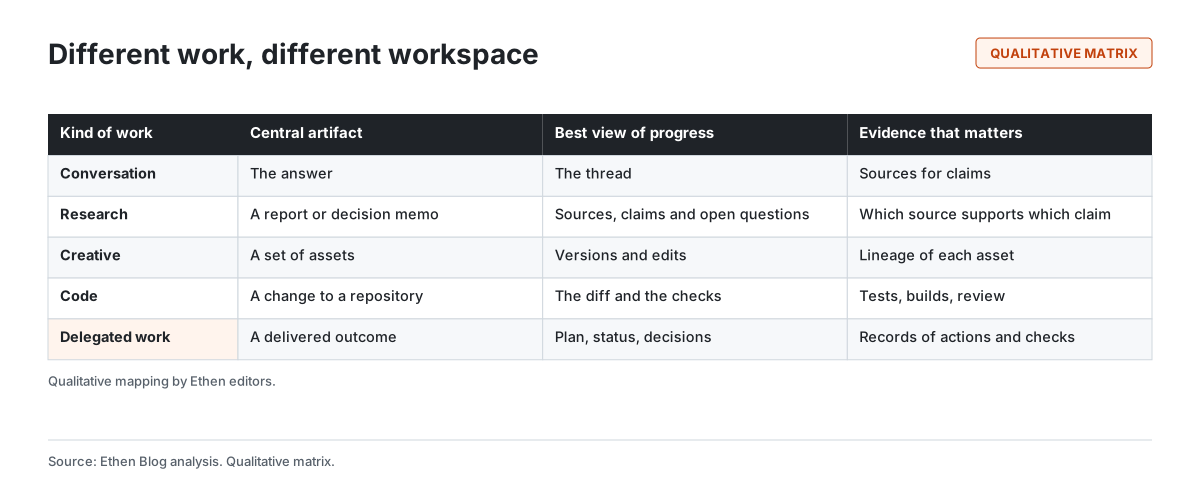
These views are genuinely different. A diff viewer is the right tool for reviewing a code change and the wrong tool for comparing two image edits. A source map is the right tool for checking a research claim and the wrong tool for following a deployment. A single universal interface can host all of them only by becoming a container for several specialized views — at which point it is a family of workspaces with a shared frame, not one workspace.
Is chat useless in a workspace?
No. Chat is one of the best interaction modes ever designed for steering AI: you can ask, redirect, clarify and explore in natural language with almost no learning curve. The mistake is treating chat as the container rather than as an interface to the container.
In a good AI workspace, conversation is how you talk to the work — "tighten the second section", "why did you pick this source?", "try the background in blue", "run the tests again" — while the work itself lives in a structure that persists. That combination keeps the ease of conversation and adds the durability, reviewability and accountability that real work needs.
Common misconceptions about AI workspaces
"A bigger context window makes chat a workspace." A larger window lets a conversation hold more text. It does not add artifacts with versions, explicit state, scoped permissions or evidence. And long inputs are used unevenly by models, so "more context" is not the same as "context reliably used".
"Memory makes chat a workspace." Memory helps a conversation remember facts about you. A workspace needs to remember the work: its current artifact, its open questions, its decisions and its checks. Personal memory and project state are different things, and mixing them makes both harder to control. We discuss that separation in How We're Rethinking AI Memory Across Ethen.
"A workspace is a heavier, slower product." It can be, if every quick question has to start with creating a project. Good design keeps the light path light: a question stays a conversation until it needs to become something more, and moving it should take one step.
"Agents make workspaces unnecessary." The opposite. The more an AI system does on its own, the more important it becomes to see the state of the work, the permissions it is using and the evidence behind its results. Autonomy without a workspace is work you cannot inspect.
"A workspace is just a nicer interface." Interface matters, but the substance is in what persists and what can be checked. A beautiful canvas that cannot show how an asset was made, or a polished document that cannot show which source supports which claim, is still missing what a workspace is for.
How should you evaluate an AI workspace?
Six questions, one for each component, separate a real workspace from a chat with extra features.
- Context: If I come back next week, will the sources, files and decisions still be organized, or will I re-paste them?
- Artifacts: Can I see and edit the current version of what is being made directly, with its history?
- State: Can I tell at a glance what is done, pending, blocked or unknown?
- Permissions: Can I scope what the AI may read and do for this piece of work, and see what needs my approval?
- People: Can a colleague review or continue the work without reading a transcript?
- Evidence: Can I see how results were checked, independently of the AI's own summary?
For a product-by-product checklist that applies these ideas to choosing among AI tools, see Choosing a Multi-Model AI Workspace.
How does Ethen approach AI workspaces?
Ethen's answer is a family of workspaces with a shared foundation. Ethen Chat is the conversational front door, deliberately focused, with light entry points into deeper work. Ethen Research, Ethen Studio, Ethen Designer, Ethen Founder and the Ethen Code workspace are each organized around their own central artifact. Underneath, one account, shared model access, shared permissions and approvals, and an evidence trail are meant to travel with the work. We explain the reasoning in Why Ethen Is a Family of Specialized AI Apps, Not One App.
Two examples show what this means in practice. Ethen Studio is evolving from a model catalog into a creative workspace with projects, history, edits and asset lineage, described in Ethen Studio: From Model Catalog to Creative Workspace. Ethen Code is moving toward software tasks that end with tests, review and a readable diff, described in Ethen Code: What We're Building Next. Both are direction; their posts say what is implemented and what is not.
An example
Illustrative example — hypothetical.
A policy analyst spends a week preparing a briefing on a new regulation. In a chat, the week looks like this: five long conversations, dozens of pasted excerpts, three slightly different drafts in three threads, a colleague who asks "which version is current?" and a manager who asks "where does this figure come from?" — and nobody can answer quickly.
In a workspace, the same week looks different. The regulation and twenty source documents live in the project. The briefing is one document with a version history. Each claim in it links to the passage that supports it, and two claims are marked as resting on a single source. Open questions sit in a short list with owners. The analyst still talks to the AI constantly — but what the conversations produce lands in the work, not in the scrollback. When the manager asks where a figure comes from, the answer is one click.
Limitations of this definition
Definitions simplify. Some excellent tools blur the boundary between chat and workspace, and some "workspaces" are little more than chats with folders. The six components are a way of thinking about what work needs, not a scoring system, and different kinds of work weight them differently. A quick question needs none of them; a regulated workflow needs all of them.
Frequently asked questions
Is an AI workspace the same as a project folder in a chat app? Not necessarily. A folder groups conversations. A workspace holds artifacts, state, permissions, people and evidence around the work itself. Some project features approach this; the test is whether the work survives without the conversation.
Do I need an AI workspace for everyday questions? No. For questions, drafts and quick help, a focused chat is the right tool. Workspaces matter when work persists, involves others, or must be checked.
Can one AI workspace handle every kind of work? Rarely well, because different work centers on different artifacts — a diff, a canvas, a source map, a job timeline. Most effective setups use specialized workspaces with shared foundations.
What makes an AI workspace trustworthy? Visible state, scoped permissions and evidence of how results were checked — so trust does not depend on the AI's own account of its work.
Related reading
- Why Long-Running AI Work Needs a Different UX Than Chat
- How We're Rethinking AI Memory Across Ethen
- AI Agents and Autonomous Work
References
- Liu, N. F. et al. (2023). Lost in the Middle: How Language Models Use Long Contexts. arXiv:2307.03172. https://arxiv.org/abs/2307.03172
- Wang, Z. et al. (2026). Lost in Compaction: Evaluating Side-Constraint Loss under Context Compaction. arXiv:2608.11242. https://arxiv.org/abs/2608.11242
- Amershi, S. et al. (2019). Guidelines for Human-AI Interaction. Proceedings of CHI 2019. https://www.microsoft.com/en-us/research/publication/guidelines-for-human-ai-interaction/
- Ethen Blog (2026). Choosing a Multi-Model AI Workspace. https://upcube.ai/blog/choosing-a-multi-model-ai-workspace
- Ethen Research Lab (2026). Evidence-Preserving Context: Compressing Agent Memory Without Losing Obligations. Research proposal; untested. https://upcube.ai/resources/research/evidence-preserving-context